
What we verified
What we verified
This guide is based on publicly documented cancellation details. It does not claim Kept completed a private account cancellation, and company flows can change after the verification date.
- officialAdobe Help: Cancel your Adobe trial or subscription
Adobe's public help page for canceling plans purchased from Adobe, including the Manage plan path and notes about unavailable cancellation options.
- officialAdobe Legal: Subscription and Cancellation Terms
Adobe's public cancellation terms, including plan-specific refund and early-termination-fee language.
Before you click cancel
Decision points that change the outcome
Who bills the plan?
Adobe's account flow applies to subscriptions bought directly from Adobe. App store, reseller, school, employer, team, and enterprise purchases can send you to a different cancellation path.
Capture:Save the account Plans page, receipt, invoice, app-store subscription screen, or admin page that identifies the billing source before you start canceling.
Is it annual paid monthly?
This is the plan shape with the clearest fee risk. Adobe says individual annual contracts paid monthly can trigger a lump-sum charge after the initial cancellation window.
Capture:Capture the exact plan label, renewal date, monthly price, remaining term, and any screen that explains the early termination fee calculation.
Are you inside the 14-day window?
Adobe's public subscription terms and Creative Cloud help explain different refund treatment inside and outside the first 14 days for many plans.
Capture:Save the original purchase date, renewal date, invoice date, trial-conversion date, and the cancellation screen that says whether a refund or fee applies.
Is the cancel option missing or blocked?
Adobe's help says the cancellation option may be unavailable while payment is processing or if there is a payment problem. That can matter if a renewal date or trial deadline is close.
Capture:Record the missing button, processing-payment message, error, support handoff, browser timestamp, and any chat response that tells you what to do next.
Fee risk map
Plan types to identify before canceling
Monthly plan
Usually the lowest fee risk, but access, refund, and final billing can still depend on the specific product and billing date.
Show that the plan is month-to-month, not annual paid monthly, and capture the final access-through date.Annual plan, paid monthly
Highest practical fee risk. Adobe says canceling after 14 days can result in a charge equal to 50% of the remaining contract obligation for individual annual contracts paid monthly.
Capture the plan label, remaining months, fee disclosure, final amount, and whether Adobe presents a no-fee alternative such as changing plans.Annual plan, prepaid
Refund and access treatment can differ from annual paid monthly because the term was paid up front.
Save the purchase date, renewal date, refund language, and final cancellation confirmation that explains whether access continues.Trial or recently converted trial
The time window matters most. A trial can become a paid plan, and many Adobe refund references turn on the first 14 days.
Capture the trial start date, conversion date, cancellation date, next charge date, and any refund or no-refund message.Third-party, team, school, or enterprise plan
Adobe Account may not be the final cancellation authority. The path may move to Apple, Google, a reseller, an administrator, or support.
Capture the handoff message and the third-party or admin confirmation, not only the Adobe dashboard.Adobe dispute packet checklist
If the issue is an early termination fee, a missing cancel option, or a charge after cancellation, this is the evidence set that would make the timeline easier to reconstruct.
- A screenshot or recording of Adobe Account showing the exact product, plan type, billing source, renewal date, and account identifier.
- The screen that discloses the early termination fee, refund result, final charge, remaining access, or no-refund outcome.
- Any retention offer, plan-change offer, discount, warning, or intermediate screen that appears before final cancellation.
- Any unavailable-button, payment-processing, payment-problem, or support-required message that prevents self-service cancellation.
- A support chat transcript or email where the agent states the cancellation request date, effective date, fee or refund outcome, and ticket number.
- The final cancellation confirmation page or email, plus the following card or bank statement if the dispute is about a later charge.
How this guide was built
For Adobe, Kept treats the plan taxonomy as the guide's core fact pattern. We checked Adobe's cancellation help and Adobe's subscription and Creative Cloud terms, then organized the guide around the evidence a customer would need if the issue is an early termination fee, missing cancel option, support handoff, or continued billing after cancellation.
Cancellation steps
Confirm where you bought the subscription
Start by checking whether the plan was purchased directly from Adobe, through an app store, through a reseller, or through a school or employer. Adobe's public cancellation help is written for plans purchased from Adobe. If the subscription came from a third party, the cancellation path may move to that provider instead of the normal Adobe Account flow.
Open Adobe Account and find the active plan
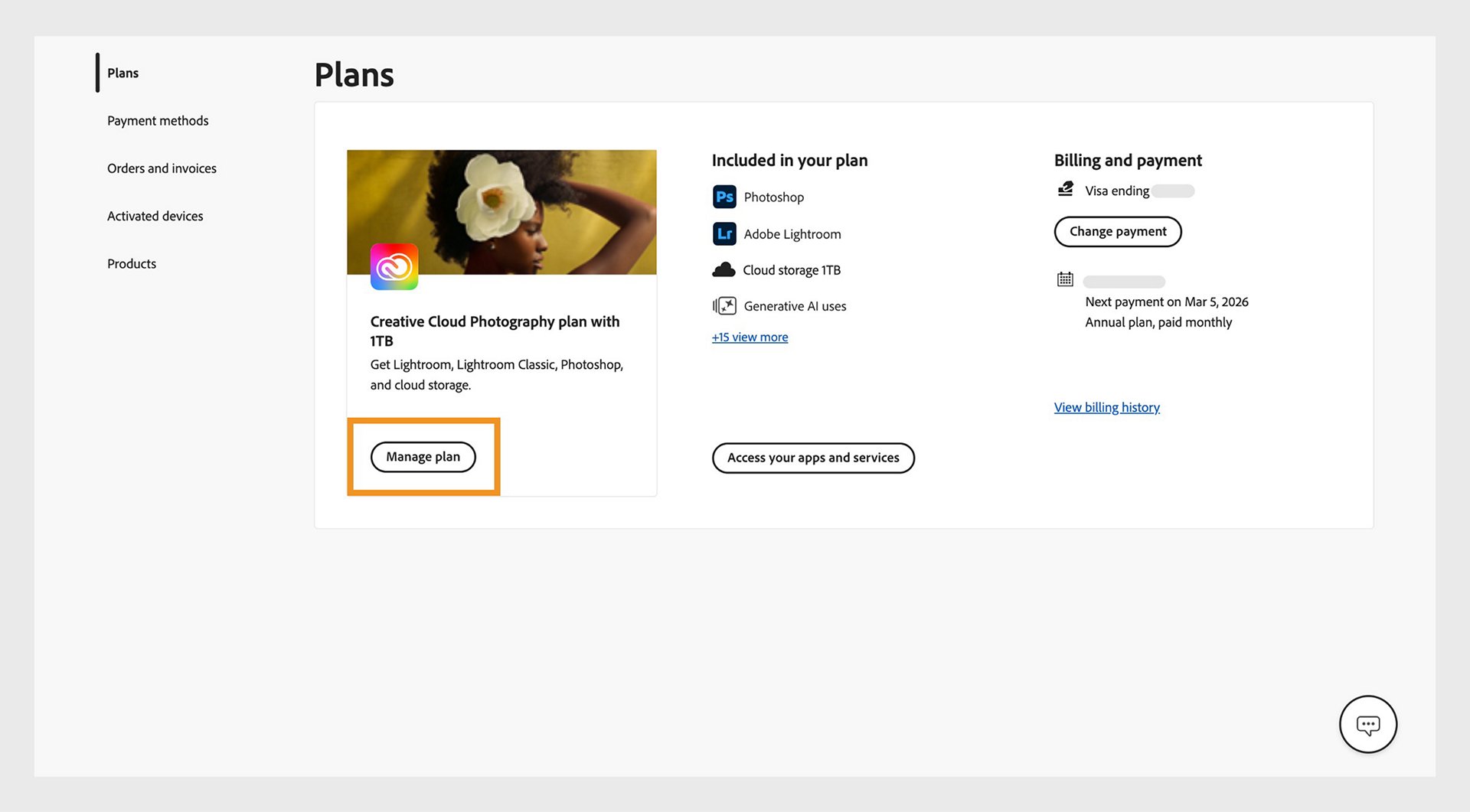
Sign in at account.adobe.com, open the Plans area, and identify the exact product you want to cancel, such as Creative Cloud All Apps, Photoshop, Acrobat, Lightroom, or an Adobe Stock plan. Adobe's help page says the Manage plan button for an active plan is where the cancellation option appears.
Select Manage plan, then look for Cancel your plan
Choose Manage plan for the subscription you want to end, then look for the cancellation option. Adobe notes that the option may be unavailable while a payment is processing or if there is a payment problem, so a missing button is worth documenting before you contact support.
Read the plan, refund, and fee screen carefully
Do not click through this part quickly. Adobe's legal terms say cancellation treatment depends on the plan. For individual annual contracts paid monthly, Adobe says canceling after 14 days can result in a lump-sum charge equal to 50% of the remaining contract obligation, with service continuing until the end of that month's billing period.
Decline offers only if you still want to cancel
Adobe may show plan changes, discounts, free-month offers, or warnings before the final cancellation. Treat these as intermediate screens, not proof that the subscription is canceled, and continue until Adobe shows a clear final status.
Continue until you have final confirmation
The useful endpoint is a page or email that clearly says the plan is canceled, along with the effective date, refund or fee result, and product name. If you switch to chat or phone support because the online flow fails, ask the agent to state the cancellation date and final billing result in writing.
Common pitfalls
- The same Adobe product can have different cancellation consequences depending on whether the plan is monthly, annual paid monthly, annual prepaid, a trial, a team plan, or purchased through another provider.
- A retention offer, plan-change offer, discount, or free-month offer is not cancellation proof. Keep going until Adobe shows final cancellation confirmation.
- Adobe's terms say the cancellation option may not be available while payment is processing or if there is a payment problem. If that happens, capture the error or missing button and contact support.
- If customer support handles the cancellation, a chat transcript or email confirmation may be more useful than a screenshot of the account dashboard alone.
What to capture as proof
- The account email or account identifier visible in Adobe Account.
- The exact product and plan name, including whether it says monthly, annual paid monthly, annual prepaid, trial, team, or marketplace purchase.
- The Manage plan page that shows the active subscription you intend to cancel.
- Any screen that mentions refund eligibility, early termination fee, remaining contract obligation, final billing date, or remaining access.
- Any error, missing cancellation option, processing-payment message, or instruction to contact support.
- Retention offers or plan-change offers you decline on the way to cancellation.
- The final cancellation confirmation page, confirmation email, or support transcript with the date and final billing outcome.
Frequently asked questions
Can I cancel Adobe online?
Adobe says subscriptions purchased directly from Adobe can be canceled through Adobe Account by opening Plans, selecting Manage plan, and choosing the cancellation option. If you bought through a third party, you may need to cancel through that provider.
Why does Adobe show an early termination fee?
Adobe's cancellation terms say some annual contracts paid monthly can trigger a charge after the initial refund window. For individual annual contracts paid monthly, Adobe says canceling after 14 days can result in a lump-sum charge equal to 50% of the remaining contract obligation.
What if the cancel button is missing?
Adobe says the cancellation option may be unavailable while payment is processing or if there is a payment problem. Capture that screen, wait if Adobe says processing is still underway, and contact Adobe support if the option still does not appear.
What proof should I keep after canceling Adobe?
Keep the active plan page, the cancellation path, any fee or refund disclosure, any support transcript, and the final cancellation confirmation. A short local recording can be useful because it shows the sequence, not just the last screen.
Kept isn't affiliated with or endorsed by Adobe. Adobe and other names are trademarks of their owners and are used here only to identify the service. This guide is general information based on Adobe's public help pages, not legal advice.