What we verified
What we verified
This guide is based on publicly documented cancellation details. It does not claim Kept completed a private account cancellation, and company flows can change after the verification date.
- officialApple Support: How to cancel Apple TV
Apple's web steps at tv.apple.com, the Settings fallback, and Google Play and Amazon billing.
- officialApple Support: Cancel a subscription from Apple
Device steps, the no-Cancel-button and red expiration message meaning, finding the Apple Account on the receipt, family members, carrier-provided subscriptions, and canceling trials at least 24 hours before they end.
Before you click cancel
Decision points that change the outcome
Apple, Google Play, or Amazon?
Only the company that bills you can cancel it.
Capture:Capture the receipt or subscription page that names the biller.
Whose Apple Account is on the receipt?
A family member's subscription can only be canceled by them.
Capture:Capture the receipt.
Trial ending soon?
Apple says cancel at least 24 hours before the trial ends.
Capture:Capture the trial end date and when you canceled.
Fee risk map
Plan types to identify before canceling
Billed by Apple
Access continues to the expiration date shown after canceling.
The Subscriptions page with the expiration date.Billed by Google Play or Amazon
Cancel and handle refunds there.
That platform's cancellation confirmation.Free trial
Apple says cancel at least 24 hours before it ends to avoid renewal.
The trial end date and your cancel time.Apple TV dispute packet checklist
If the issue is an early termination fee, a missing cancel option, or a charge after cancellation, this is the evidence set that would make the timeline easier to reconstruct.
- The Apple receipt showing the Apple Account, amount, and date.
- The Subscriptions page before canceling.
- Screenshots of Cancel Subscription and the confirmation.
- The Subscriptions page afterward with the expiration date.
- The statement line for any later charge.
- Any Apple Support case or chat transcript.
How this guide was built
For Apple TV, Kept focused on finding the right account and biller, since Apple only lets the billed Apple Account, Google Play, or Amazon cancel. We used Apple's How to cancel Apple TV and Cancel a subscription from Apple articles.
Cancellation steps
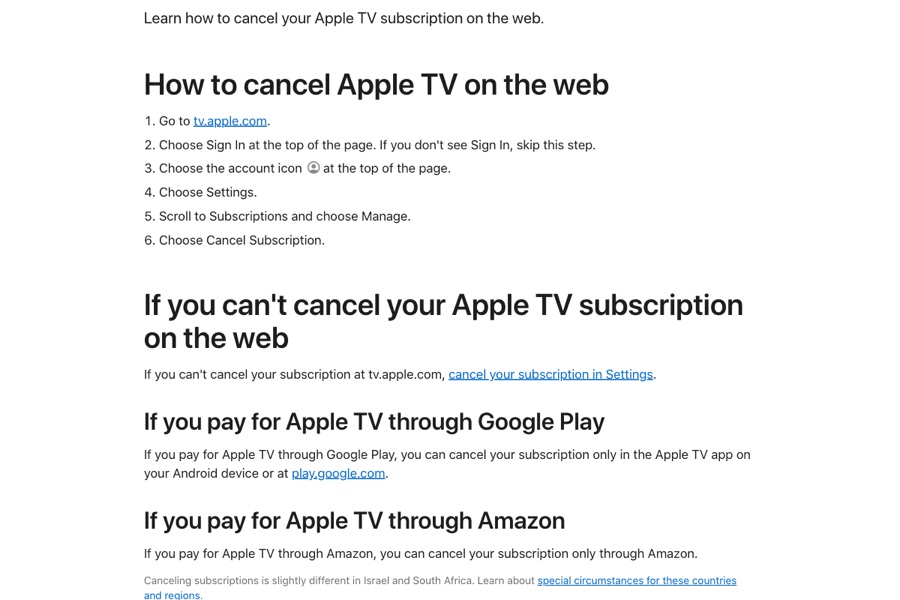
Go to tv.apple.com and sign in
Apple's web steps: go to tv.apple.com and choose Sign In at the top of the page if you see it.
Open Settings → Subscriptions → Manage
Choose the account icon at the top of the page, choose Settings, then scroll to Subscriptions and choose Manage.
Choose Cancel Subscription
Apple says if you can't cancel at tv.apple.com, cancel in Settings on your device instead.
Google Play or Amazon? Cancel there
Apple says Apple TV billed through Google Play can be canceled only in the Apple TV app on Android or at play.google.com, and Amazon-billed Apple TV only through Amazon.
Can't find it? Check the receipt
Apple says to search your email for "receipt from Apple" or "invoice from Apple" and check which Apple Account was used. If it's a family member's account, they have to cancel. If there's no Apple receipt, another company bills you.
Common pitfalls
- Apple says if there's no Cancel button or you see an expiration message in red, the subscription is already canceled.
- You can't cancel a family member's subscription. The person whose Apple Account is on the receipt has to do it.
- Apple TV billed by Google Play or Amazon can only be canceled there.
- Apple says to cancel a trial at least 24 hours before it ends if you don't want it to renew.
- Apple TV through a wireless carrier or other provider has to be canceled with that provider.
What to capture as proof
- The Subscriptions page before canceling, showing Apple TV, price, and renewal date.
- The Apple receipt showing which Apple Account is billed.
- The Cancel Subscription confirmation.
- The Subscriptions page afterward showing the expiration date.
- For Google Play or Amazon billing, that company's subscription page.
Frequently asked questions
How do I cancel Apple TV?
Go to tv.apple.com, sign in, choose the account icon → Settings, scroll to Subscriptions and choose Manage, then Cancel Subscription. If that doesn't work, cancel in Settings on your device.
Why isn't there a Cancel button for Apple TV?
Apple says no Cancel button or a red expiration message means the subscription is already canceled.
I can't find my Apple TV subscription. Why?
Apple says to check the receipt for which Apple Account was used. A family member has to cancel their own. If there's no Apple receipt, another company such as Google Play, Amazon, or your carrier bills you.
When should I cancel an Apple TV free trial?
Apple says at least 24 hours before the trial ends.
Kept isn't affiliated with or endorsed by Apple TV. Apple TV and other names are trademarks of their owners and are used here only to identify the service. This guide is general information based on Apple TV's public help pages, not legal advice.