
What we verified
What we verified
This guide is based on publicly documented cancellation details. It does not claim Kept completed a private account cancellation, and company flows can change after the verification date.
- officialPeacock Help: How do I cancel my Peacock plan?
Peacock's steps (Cancel All Subscriptions), add-on removal, confirmation message and email timing, no refunds unless required by law, chat cancellation if you can't log in, third-party billers, and where the payment method is shown.
Before you click cancel
Decision points that change the outcome
Do you see Cancel All Subscriptions?
If not, a third party probably bills you and Peacock can't cancel it.
Capture:Capture the Subscriptions tab and Payment Method.
Whole plan or one add-on?
Cancel All Subscriptions ends everything. Remove Add-On drops only the add-on.
Capture:Capture which option you chose.
Can you log in?
If not, Peacock offers cancellation through chat.
Capture:Save the chat transcript.
Fee risk map
Plan types to identify before canceling
Peacock-billed Premium or Premium Plus
The plan runs to the end of its term and doesn't renew. Peacock says no refund or credit unless the law requires it.
The on-screen confirmation and the email.Billed by Apple, Roku, Amazon, Xfinity, or another partner
Cancel and request any refund with that partner.
The partner's subscription page showing Peacock canceled.Charged after canceling
Your confirmation and the term end date show when billing should have stopped.
The confirmation, the end date, and the later charge on your statement.Peacock dispute packet checklist
If the issue is an early termination fee, a missing cancel option, or a charge after cancellation, this is the evidence set that would make the timeline easier to reconstruct.
- The Subscriptions tab before canceling with plan, add-ons, price, and payment method.
- Recording or screenshots of Cancel All Subscriptions through the on-screen confirmation.
- The confirmation email.
- The Subscriptions tab afterward.
- Any Peacock charge after the term ended, from your statement.
- Chat transcripts with Peacock or your billing partner.
How this guide was built
For Peacock, Kept organized the guide around who bills you, since Peacock says it can't cancel third-party plans. We used Peacock's How do I cancel my Peacock plan? article for the steps, add-ons, confirmation timing, refund statement, chat option, and partner list.
Cancellation steps
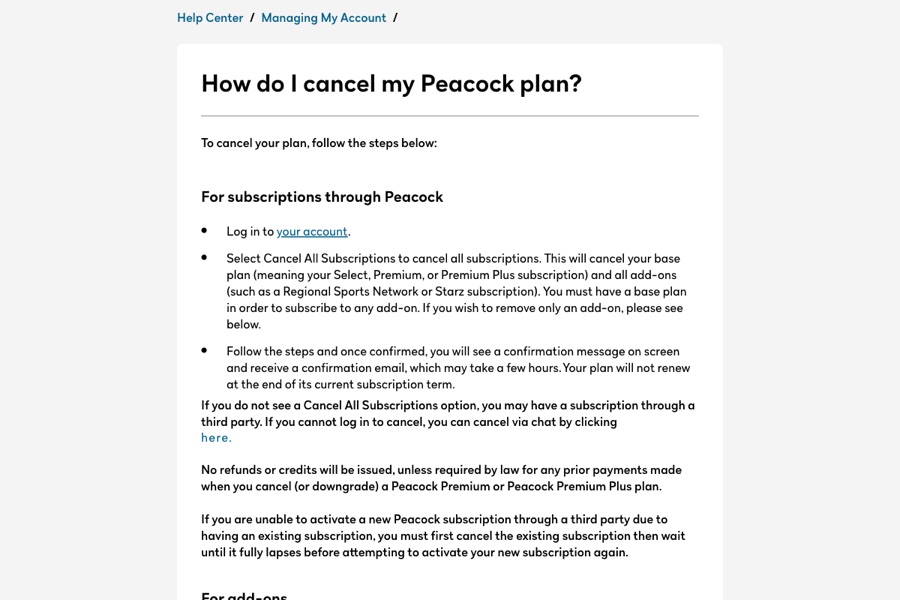
Log in and check how you're billed
Peacock says you can see your payment method in the Payment Method section under the Subscriptions tab. If it's Apple, Google, Roku, Amazon, Xfinity, Spectrum, Verizon, DIRECTV, or Xumo, cancel with that company. Peacock says it can't cancel third-party plans.
Select Cancel All Subscriptions
For subscriptions through Peacock, select Cancel All Subscriptions. Peacock says this cancels your base plan and all add-ons such as a Regional Sports Network or Starz.
Follow the steps to the confirmation
Once confirmed, Peacock shows a confirmation message on screen and sends a confirmation email, which it says may take a few hours. Your plan won't renew at the end of its current subscription term.
Removing only an add-on
To drop just an add-on, select it on the Subscriptions tab, choose Remove Add-On, and follow the steps. It won't renew at the end of its term.
If you can't log in
Peacock's help article says you can cancel via chat if you can't log in to cancel.
Wait for the old plan to lapse before switching billers
Peacock says that if you're moving to a subscription through a third party, you must cancel the existing one and wait until it fully lapses before activating the new one.
Common pitfalls
- No Cancel All Subscriptions button usually means a third party bills you. Peacock says it can't cancel those plans.
- Peacock says no refunds or credits are issued, unless required by law, when you cancel or downgrade Premium or Premium Plus.
- The confirmation email can take a few hours. Capture the on-screen confirmation so you aren't relying on the email alone.
- If Peacock came with another service or product, Peacock says you must contact that third party to cancel.
- Activating Peacock through a new biller before the old plan lapses can fail, which can leave two subscriptions in play.
What to capture as proof
- The Subscriptions tab showing your base plan, add-ons, price, renewal date, and Payment Method.
- The Cancel All Subscriptions screens and the on-screen confirmation.
- The confirmation email when it arrives.
- The Subscriptions tab afterward showing the plan won't renew.
- If you used chat, the full transcript with the date.
Frequently asked questions
How do I cancel Peacock?
Log in to your Peacock account and select Cancel All Subscriptions, then follow the steps. You'll see a confirmation on screen and get an email, which can take a few hours.
Why don't I see a cancel option on Peacock?
Peacock says you may have a subscription through a third party like Apple, Google, Roku, Amazon, Xfinity, or Verizon. Cancel with them.
Will Peacock refund me if I cancel?
Peacock says no refunds or credits are issued for prior payments when you cancel or downgrade Premium or Premium Plus, unless required by law.
Can I cancel Peacock without logging in?
Peacock's help article says you can cancel via chat if you can't log in.
Does canceling Peacock cancel my add-ons?
Yes. Cancel All Subscriptions cancels the base plan and all add-ons. To keep the plan and drop only an add-on, use Remove Add-On.
Kept isn't affiliated with or endorsed by Peacock. Peacock and other names are trademarks of their owners and are used here only to identify the service. This guide is general information based on Peacock's public help pages, not legal advice.