What we verified
What we verified
This guide is based on publicly documented cancellation details. It does not claim Kept completed a private account cancellation, and company flows can change after the verification date.
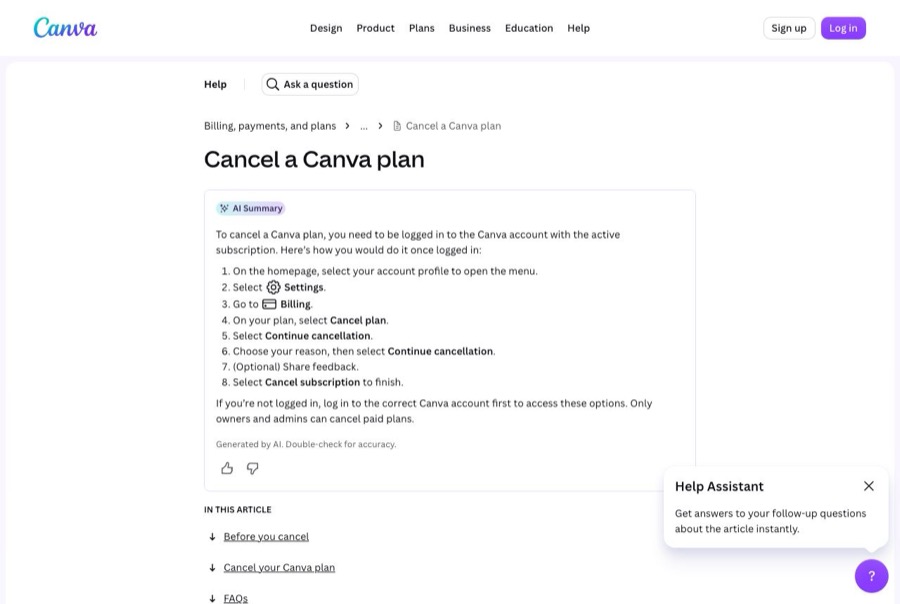
- officialCanva Help Center: Cancel a Canva plan
Canva's cancel steps for direct, Google Play, and App Store billing; the pause option; the confirmation email; what happens after canceling for individuals and teams; Teams cancellation being permanent; and troubleshooting for can't-cancel and still-charged cases, including UTC billing.
- officialCanva Help Center: Refunds for Canva subscriptions
Canva's refund page: subscriptions generally aren't refundable under its Terms of Use, Canva reviews each request, processing times by payment method, and Apple-billed refunds handled by Apple.
Before you click cancel
Decision points that change the outcome
Which account and team is paying?
Canva says still-charged cases often come from canceling on a second account or a different team than the one with the plan.
Capture:Capture the Billing page showing the account email, team name, and plan.
Canva, Apple, Google, or PayPal?
App Store and Google Play plans must be canceled there, and Apple handles its own refunds.
Capture:Capture the statement line and the matching subscription screen.
Pause or cancel?
A pause lasts up to 3 months and then resumes billing automatically.
Capture:Capture the screen where you chose to cancel.
Is it a Teams plan?
Canceling Canva Teams is permanent, and every team member loses paid features at the end of the period.
Capture:Capture the plan type and the end date.
Fee risk map
Plan types to identify before canceling
Free trial
Cancel before the trial ends to avoid the first charge. Canva bills on UTC, so the charge can land a day early in U.S. time zones.
The trial end date and the confirmation email, with the time you canceled.Monthly or yearly plan billed by Canva
Charges stop and paid features continue to the end of the period. Canva says subscriptions generally aren't refundable but it reviews requests.
The confirmation email and the Billing page showing the end date.Billed by Apple or Google Play
Cancel and request refunds through the app store under its rules.
The app-store subscription screen showing Canva canceled.Canva dispute packet checklist
If the issue is an early termination fee, a missing cancel option, or a charge after cancellation, this is the evidence set that would make the timeline easier to reconstruct.
- The Billing page before canceling, showing plan, price, renewal date, account email, and team.
- Recording or screenshots of every cancellation screen through Cancel subscription.
- The cancellation confirmation email.
- The Billing page afterward showing the plan ending.
- Any Canva charge on your statement after the end date, with the invoice ID.
- Support messages with Canva, including the invoice copy Canva asks for.
How this guide was built
For Canva, Kept organized the guide around the wrong-account and wrong-team mix-ups that Canva's own help center calls out. We used Canva's Cancel a Canva plan article for the steps, pause option, team rules, and troubleshooting, and its Refunds for Canva subscriptions article for refund rules.
Cancellation steps
Find which account, team, and biller has the plan
Canva says to check your billing email or bank statement to see whether the charge comes from Canva, Google, Apple, or PayPal. If you have more than one Canva login or belong to several teams, find the one with the paid plan. Only owners and admins can cancel paid plans.
Consider whether you really mean pause
Canva offers to pause Pro, Teams, or Business plans for up to 3 months with no charges, after which the plan resumes automatically with an email reminder. If you want charges to stop for good, cancel instead.
Canceling a plan billed by Canva
Canva's published desktop steps: log in to the right account or team, select your account profile → Settings → Billing, select Cancel plan on your plan, select Continue cancellation, choose a reason and select Continue cancellation again, optionally give feedback, then select Cancel subscription.
Canceling a plan billed by Apple or Google Play
App Store: on iPhone or iPad, Settings → your name → Subscriptions → Canva → Cancel Subscription. Google Play: Play Store → profile icon → Payments & subscriptions → Subscriptions → Canva → Cancel subscription. Canva says these can't be canceled inside the Canva app.
Wait for the confirmation email
Canva sends a confirmation email when the plan is canceled. Canva's own troubleshooting says that if you can't find one, the cancellation may not have gone through and you should try again. Keep the email.
Know what changes after canceling
Canva says you keep paid features until the end of the billing period. Your designs stay on Canva Free and your account stays active. For Teams, members lose paid features at the end of the period, and canceling Canva Teams is permanent: you can't resubscribe to Teams later.
Common pitfalls
- Canceling on the wrong Canva account or team leaves the paid plan running. Canva lists this as a top reason people are still charged.
- App Store and Google Play subscriptions can't be canceled in Canva, and uninstalling the app doesn't cancel them.
- No confirmation email can mean the cancellation didn't complete. Canva says to try again if you don't have one.
- Canva bills on UTC, so a trial can convert and charge a day earlier than you expect in U.S. time zones.
- Canceling Canva Teams is permanent. If your team might need it later, Canva suggests switching to Canva Business instead.
- Some banks keep recurring payments going even after a card is canceled or expires, so a canceled card isn't a canceled plan.
What to capture as proof
- The Billing page showing the plan, price, renewal date, and the account email and team you're in.
- The charge on your statement and who it came from (Canva, Apple, Google, or PayPal).
- Each screen from Cancel plan through both Continue cancellation steps to Cancel subscription, including any pause offer you declined.
- The cancellation confirmation email.
- The Billing page afterward showing the plan ending and the date paid features stop.
- For app-store plans, the Apple or Google subscription screen showing Canva canceled.
Frequently asked questions
How do I cancel Canva Pro?
On the web or desktop: select your account profile → Settings → Billing, choose Cancel plan, select Continue cancellation twice (choosing a reason), then select Cancel subscription. Canva emails a confirmation.
I canceled Canva but I'm still being charged. Why?
Canva lists three common reasons: you have another Canva account and canceled the wrong one, you subscribed through Google Play or the App Store, or the cancellation didn't go through. If there's no confirmation email, cancel again.
Can I get a refund from Canva?
Canva says subscriptions generally aren't refundable under its Terms of Use, but it reviews every request. App Store purchases are refunded by Apple.
Why was I charged a day before my Canva trial ended?
Canva bills on UTC, so depending on your time zone the charge can appear a day earlier than expected.
What happens to my designs after canceling Canva Pro?
Canva says all designs stay accessible on Canva Free and your account stays active. Paid features end when the billing period ends.
Kept isn't affiliated with or endorsed by Canva. Canva and other names are trademarks of their owners and are used here only to identify the service. This guide is general information based on Canva's public help pages, not legal advice.