What we verified
What we verified
This guide is based on publicly documented cancellation details. It does not claim Kept completed a private account cancellation, and company flows can change after the verification date.
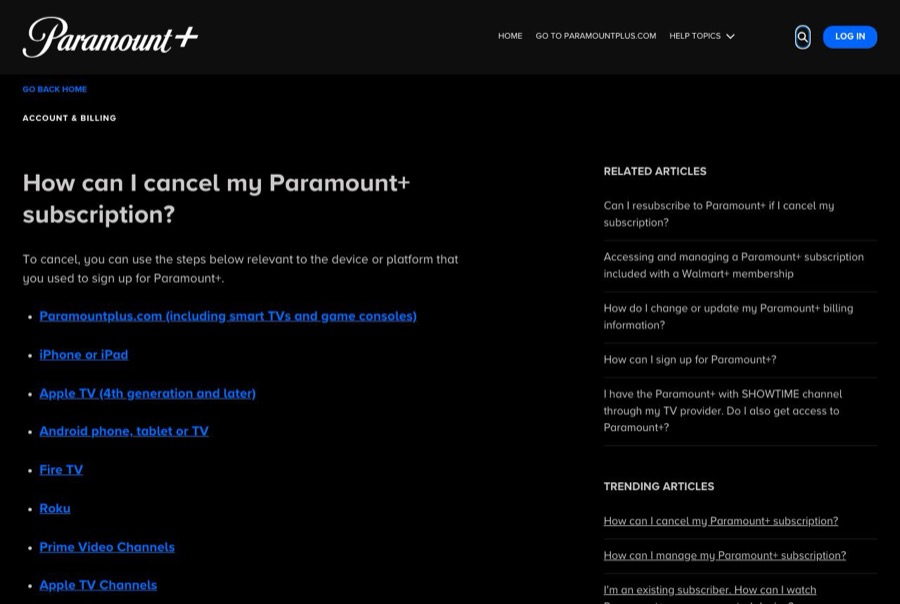
- officialParamount+ Help: How can I cancel my Paramount+ subscription?
Paramount+'s cancel steps for paramountplus.com (including smart TVs and consoles), iPhone/iPad, Apple TV, Android/Google Play, Fire TV/Amazon, Roku, Prime Video Channels, and Apple TV Channels; the Help Center chat route when you can't sign in; and the note that uninstalling on Android TV doesn't cancel.
- officialParamount+ Help: Can I resubscribe to Paramount+ if I cancel my subscription?
Paramount+'s steps for resubscribing with the original email, and that app signups use the billing of the platform or partner (Amazon, Apple, Google, Roku).
Before you click cancel
Decision points that change the outcome
Who bills you?
Paramount+ can only cancel subscriptions it bills directly. Apple, Google Play, Amazon, Roku, and Prime Video Channels subscriptions are canceled on those platforms under their refund rules.
Capture:Capture the statement line or receipt that names the biller.
Is it a channel inside another service?
Paramount+ on Prime Video Channels or Apple TV Channels is canceled inside Prime Video or Apple TV, separately from those services.
Capture:Capture the channel subscription list showing Paramount+ and its price.
Can you still sign in?
If not, Paramount+ points you to its Help Center chat. A chat cancellation only counts as proof if you save the transcript.
Capture:Save the chat transcript and confirmation number.
Fee risk map
Plan types to identify before canceling
Billed directly by Paramount+ (web, smart TV, or console signup)
Cancel on paramountplus.com under Account. The help article doesn't describe refunds, so expect the subscription to end at the end of the paid period unless Paramount+ shows otherwise.
The Account page before and after, and the cancellation confirmation.Billed by Apple, Google Play, Amazon, or Roku
Cancel with the platform; refunds follow that platform's policy.
The platform's subscription screen showing Paramount+ canceled and the end date.Prime Video Channels or Apple TV Channels
Unsubscribe from the channel inside Prime Video or Apple TV. The main Prime or Apple TV subscription is unaffected.
The channel list showing Paramount+ removed or ending.Paramount+ dispute packet checklist
If the issue is an early termination fee, a missing cancel option, or a charge after cancellation, this is the evidence set that would make the timeline easier to reconstruct.
- The statement line or receipt identifying who bills you for Paramount+.
- The subscription or Account page before canceling, with plan, price, and renewal date.
- Recording or screenshots of every step to the final confirmation, including declined offers.
- The cancellation confirmation screen and email, or the chat transcript and confirmation number.
- The subscription page afterward showing Paramount+ canceled or ending.
- Any Paramount+ charge on your statement dated after the confirmed end.
How this guide was built
For Paramount+, Kept organized the guide around who bills you, because most cancellation trouble comes from looking in the wrong place. We used Paramount+'s own cancellation help article for each platform's steps and the chat route, and its resubscribe article for how app-store billing carries over.
Cancellation steps
Find out who bills you before you look for the button
Paramount+ says you cancel using the steps for the device or platform you used to sign up. Check your card statement or app-store receipts: a charge from Apple, Google, Amazon, or Roku means the cancellation happens there, not on paramountplus.com.
Web, smart TV, or console signups: cancel on paramountplus.com
Paramount+'s published steps for subscriptions started on the web, a smart TV (LG, Vizio, Samsung), or a game console (Xbox, PS4, PS5): visit paramountplus.com, click your username in the upper right, click Account, scroll down, and click Cancel subscription.
Apple: cancel in your Apple subscriptions
On an iPhone or iPad, open Settings, tap your name, tap Subscriptions, choose Paramount+, and tap Cancel Subscription. Paramount+ notes that if you don't see Cancel Subscription, the subscription is already canceled and won't renew. Apple TV Channels subscriptions are canceled under Users and Accounts → your name → Subscriptions.
Google Play, Amazon, Roku, or Prime Video Channels: cancel there
Google Play: g.co/play/subscriptions → Paramount+ → Cancel subscription. Amazon/Fire TV: amazon.com/appstoresubscriptions → Actions → Cancel your subscription. Roku: highlight the Paramount+ channel, press * on the remote → Manage Subscription → Cancel Subscription. Prime Video Channels: Account & Settings → Your subscriptions → Paramount+ → Unsubscribe.
Can't sign in? Use the Help Center chat
Paramount+ says that if you want to cancel and can't log in, go to the Help Center homepage, click the blue chat bubble, and type "Agent". Save the chat transcript and any confirmation number the agent gives you.
Save the confirmation and check it stuck
Keep the confirmation screen and email from whoever bills you. Afterward, check the Account page or the platform's subscription list to confirm Paramount+ shows as canceled or ending on a date.
Common pitfalls
- Looking for a cancel button on paramountplus.com won't help if Apple, Google, Amazon, Roku, or Prime Video Channels bills you. Cancel on that platform.
- Uninstalling the app doesn't cancel. Paramount+ specifically says uninstalling on Android TV does not cancel your subscription.
- Paramount+ through Prime Video Channels is a separate subscription from Amazon Prime. Ending Prime doesn't end the channel, and ending the channel doesn't end Prime.
- Paramount+ included with Walmart+ is handled through Walmart+; Paramount+ has a separate help article for that setup.
- On Apple TV, you can only edit subscriptions for tvOS apps installed on that Apple TV, so you may need to cancel from an iPhone or iPad instead.
What to capture as proof
- Your card statement or app-store receipt showing who charges you for Paramount+ and how much.
- The paramountplus.com Account page (or the platform's subscription screen) showing the plan, price, and renewal date.
- Every screen between Cancel subscription and the final confirmation, including any discount or plan-switch offer you declined.
- The final confirmation screen and email.
- If you used chat, the full transcript, the agent's name, and any confirmation number.
- The subscription page afterward showing Paramount+ canceled or ending on a date.
Frequently asked questions
How do I cancel Paramount+?
If you signed up on paramountplus.com, a smart TV, or a game console: go to paramountplus.com, click your username → Account, scroll down, and click Cancel subscription. If Apple, Google Play, Amazon, Roku, or Prime Video Channels bills you, cancel there.
Why can't I cancel Paramount+ on the website?
Usually because another company bills you. Paramount+ says subscriptions bought through the Apple App Store, Google Play, Amazon, or Roku have to be canceled on that platform. Check your card statement for the biller's name.
How do I cancel Paramount+ if I can't log in?
Paramount+ says to go to its Help Center homepage, click the blue chat bubble at the bottom of the screen, and type "Agent". Save the transcript as proof.
Does deleting the Paramount+ app cancel my subscription?
No. Paramount+ says uninstalling the app on Android TV doesn't cancel your subscription, and the same is true elsewhere. Cancel with whoever bills you.
How do I cancel Paramount+ on Prime Video?
In Prime Video, go to Account & Settings → Your subscriptions, find the Paramount+ channel, and select Unsubscribe. This doesn't affect your Amazon Prime membership.
Kept isn't affiliated with or endorsed by Paramount+. Paramount+ and other names are trademarks of their owners and are used here only to identify the service. This guide is general information based on Paramount+'s public help pages, not legal advice.