What we verified
What we verified
This guide is based on publicly documented cancellation details. It does not claim Kept completed a private account cancellation, and company flows can change after the verification date.
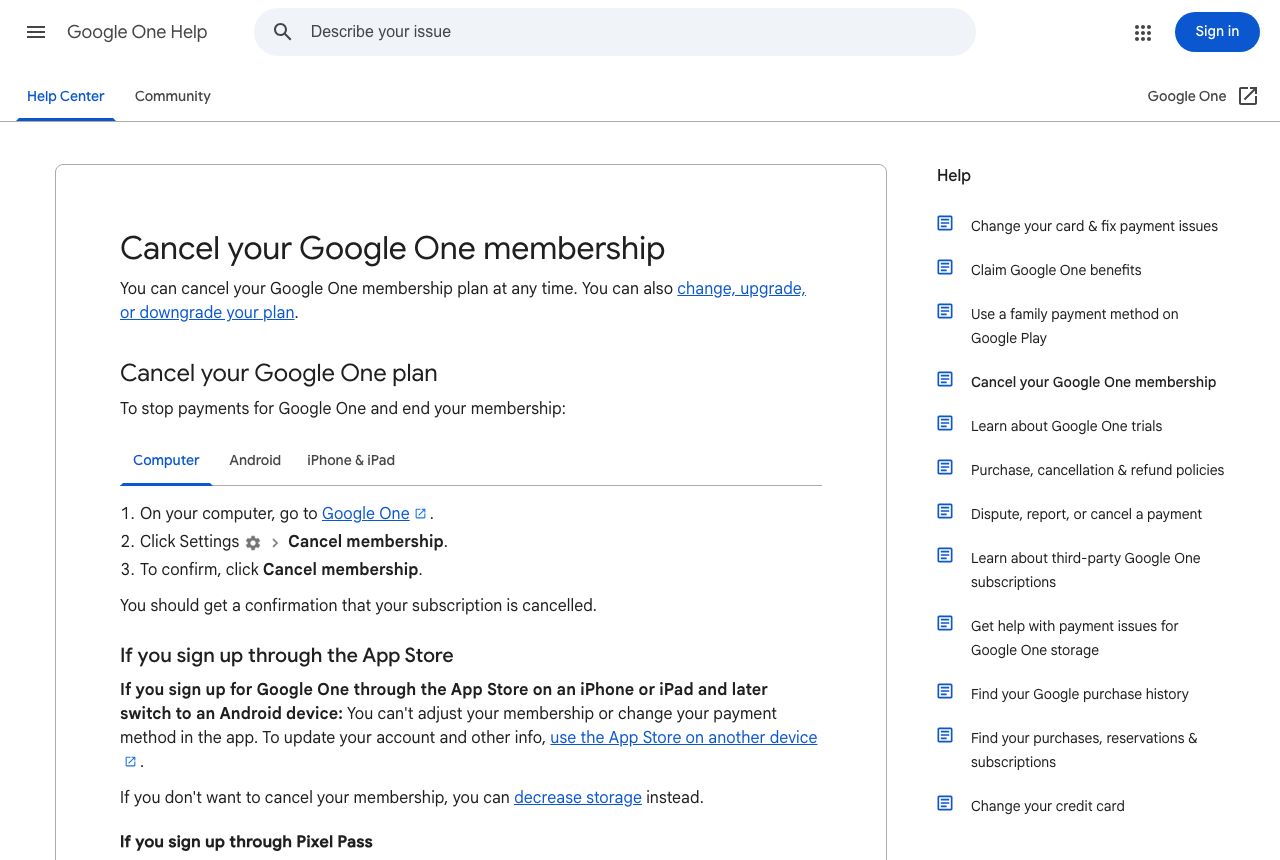
- officialGoogle One Help: Cancel your Google One membership
Google's cancel steps (Google One → Settings → Cancel membership → confirm), App Store and Pixel Pass exceptions, the non-refundable storage policy in most countries, what happens over 15 GB for Gmail, Drive, and Photos, family members losing extra storage, benefits lasting to the end of the billing cycle, and immediate end for Metro by T-Mobile plans.
Before you click cancel
Decision points that change the outcome
Google, Apple, or Pixel Pass?
Google-billed plans are canceled in Google One Settings. App Store plans go through Apple, and Pixel Pass plans require canceling Pixel Pass.
Capture:The screen showing who bills the plan and how much.
Will anyone be over 15 GB?
Over the free limit, Gmail stops sending and receiving and Drive and Photos stop syncing for that person.
Capture:Storage usage per family member before you cancel.
Cancel or downgrade?
A smaller plan keeps you under quota without losing everything; canceling drops everyone to 15 GB.
Capture:The plan options page if you choose to downgrade.
Fee risk map
Plan types to identify before canceling
Monthly or annual plan billed by Google
Google says storage purchases are non-refundable in most countries; you keep the plan until the end of the billing cycle.
The cancel confirmation and the end date, so a later renewal is clearly an error.Bought through the App Store
Cancel in the App Store and request any refund from Apple.
The App Store subscription screen and Apple's refund decision.Included with Pixel Pass
Canceling requires ending Pixel Pass; Google says you may not be eligible for a refund depending on timing.
The Pixel Pass cancellation confirmation.Google One dispute packet checklist
If the issue is an early termination fee, a missing cancel option, or a charge after cancellation, this is the evidence set that would make the timeline easier to reconstruct.
- Google One Settings before canceling: plan, price, renewal date, account.
- Storage usage before canceling.
- Recording of the Cancel membership flow and confirmation.
- Google's confirmation message or email and the stated end date.
- Any charge on your statement after that date.
- Support chat transcript if you contacted Google One support.
How this guide was built
For Google One, Kept built the guide around storage, because losing Gmail and Drive access after a plan ends is the most damaging surprise. We used Google One Help's cancellation article for the cancel path, billing exceptions, refund policy, and over-quota restrictions.
Cancellation steps
Check who bills your plan
Google One bought on the web or Google Play is canceled in Google One. Google says plans bought through the Apple App Store are managed through the App Store, and refunds for App Store purchases are requested from Apple. If your 200 GB plan came with Pixel Pass, Google says you have to cancel Pixel Pass to end it. If your plan is sponsored by Metro by T-Mobile, it ends immediately when you cancel.
Check storage for you and your family group
When the plan ends, Google says you and your family members keep only the free 15 GB each. Anyone over that limit can't send or receive Gmail (incoming mail bounces), can't upload or sync to Drive or create new Docs, Sheets, or Slides, and can't back up to Google Photos. Clean up or download data first if you're near or over 15 GB.
Consider downgrading instead
Google says you can decrease your storage plan instead of canceling. If you only need a little more than 15 GB, a smaller plan avoids the Gmail and Drive restrictions.
Open Google One Settings and cancel
On a computer, go to Google One, click Settings, then Cancel membership. Click Cancel membership again to confirm. Google One may list the benefits you'll lose before the final button.
Save the confirmation
Google says you should get a confirmation that your subscription is canceled. Keep it, and check that Google One shows the date your plan ends. Your storage and benefits last until the end of the billing cycle.
Common pitfalls
- Being over 15 GB after the plan ends stops Gmail from sending and receiving. Incoming mail is returned to the sender, which is easy to miss.
- Canceling removes extra storage for everyone in your family group, not just you.
- Google says storage purchases are non-refundable in most countries. You keep the storage until the end of the billing cycle instead.
- Premium subscriptions bundled with your plan (Google says this includes YouTube Premium, Google Home Premium, and Google Health Premium where applicable) end too.
- App Store and Pixel Pass plans can't be canceled from Google One's own Settings.
What to capture as proof
- Google One Settings showing the plan, price, renewal date, and Google account.
- Storage usage for you and each family member before canceling.
- The benefits-lost screen and the Cancel membership confirmation.
- The confirmation message or email that your subscription is canceled, and the end date.
- For App Store plans, the App Store subscription screen showing it's canceled.
- Any charge after the end of the billing cycle.
Frequently asked questions
How do I cancel Google One?
On a computer, go to Google One, click Settings, then Cancel membership, and click Cancel membership again to confirm. Google says you should get a confirmation that your subscription is canceled.
What happens to my Gmail if I cancel Google One?
If you're using more than the free 15 GB when the plan ends, Google says you can't send or receive Gmail and messages sent to you are returned to the sender. Clean up storage or download data before the billing cycle ends.
Can I get a refund for Google One?
Google says storage plan purchases are non-refundable in most countries; you keep the storage for the rest of the billing cycle. App Store purchases follow Apple's refund process.
Does canceling Google One affect my family?
Yes. Google says you and your family members lose the additional storage and member benefits, keeping up to 15 GB each at no charge.
When does my Google One plan actually end?
Google says your storage and benefits last until the end of the current billing cycle. Plans sponsored by Metro by T-Mobile end immediately when you cancel.
Kept isn't affiliated with or endorsed by Google One. Google One and other names are trademarks of their owners and are used here only to identify the service. This guide is general information based on Google One's public help pages, not legal advice.