
What we verified
What we verified
This guide is based on publicly documented cancellation details. It does not claim Kept completed a private account cancellation, and company flows can change after the verification date.
- officialMicrosoft Support: Cancel a Microsoft 365 subscription
Microsoft's cancel steps (account.microsoft.com/services/microsoft365 → Cancel subscription → I don't want my subscription), the Turn on recurring billing note, store and retailer purchase exceptions, and the storage reduction to 5 GB cloud and 15 GB Outlook.com for the subscriber and shared Family members.
- officialMicrosoft Support: Microsoft subscription refund policy
Refunds within 30 days of initial purchase or before the first recurring billing date (whichever is sooner), a one-time refund of the most recent renewal if canceled within 30 days of payment, prepaid retail codes excluded, and prorated refunds in some countries.
- officialMicrosoft Support: Turn recurring billing on or off
Turning off recurring billing stops future charges while the subscription stays usable until its expiry date.
Before you click cancel
Decision points that change the outcome
Bought from Microsoft or someone else?
Only subscriptions bought from Microsoft are canceled and refunded in your Microsoft account. App Store, Google Play, and retailer purchases go through the seller.
Capture:Your receipt or the store subscription page showing who sold it.
How recently were you charged?
Microsoft's refund windows are 30 days from first purchase (or before first renewal) and 30 days from your most recent renewal payment, the latter once per account per product.
Capture:The date and amount of your last charge, and the refund result Microsoft shows.
Are you over 5 GB, or sharing a Family plan?
Canceling reduces storage for everyone on the plan. Over-quota accounts lose OneDrive sync and Outlook.com email, and files may be deleted after 6 months.
Capture:Storage usage for you and family members before canceling.
Fee risk map
Plan types to identify before canceling
New subscription, within 30 days and before first renewal
Microsoft says a refund is generally available when you cancel in this window.
Purchase date, cancel confirmation, and the refund shown.Renewed within the last 30 days
Microsoft says you're entitled to a refund of the most recent renewal charge, once per account per subscription product.
Renewal charge date, cancel date, and refund confirmation.Renewed more than 30 days ago
Usually no refund in the U.S.; the subscription stays usable until it expires. Some countries offer prorated refunds.
The expiry date shown after canceling, so a later charge is clearly an error.Bought via App Store, Google Play, or a retailer
Cancel and request any refund from that seller.
The seller's subscription page and refund decision.Microsoft 365 dispute packet checklist
If the issue is an early termination fee, a missing cancel option, or a charge after cancellation, this is the evidence set that would make the timeline easier to reconstruct.
- Services & subscriptions before canceling: plan, price, renewal date, account.
- Recording of the cancel flow through I don't want my subscription.
- The refund eligibility or no-refund screen.
- Services & subscriptions afterward showing canceled or expiring, plus Microsoft's email.
- Any later charge on your statement.
- Support chat transcript and case number if you contacted Microsoft.
How this guide was built
For Microsoft 365, Kept focused on the two things that catch people out: refund eligibility, which you only see after canceling, and the storage drop that hits family members. We used Microsoft Support's cancel, refund policy, and recurring billing articles.
Cancellation steps
Check where you bought it
Microsoft says Microsoft 365 bought through Google Play or the Apple App Store is canceled and refunded through those stores, and subscriptions from a retailer such as Amazon or Harvey Norman are managed by that retailer. Prepaid retail product keys follow the retailer's return policy. Everything below is for subscriptions bought directly from Microsoft.
Check your OneDrive and Outlook storage first
Microsoft says canceling drops your storage to 5 GB of cloud storage (OneDrive plus Outlook.com attachments) and 15 GB of Outlook.com mailbox storage, and on Family or Premium plans everyone you share with is reduced too. Anyone over the free allowance can't upload or sync new files or send and receive Outlook.com email, and after 6 months Microsoft may delete their OneDrive. Download or move files before you cancel.
Open Microsoft 365 in your Microsoft account
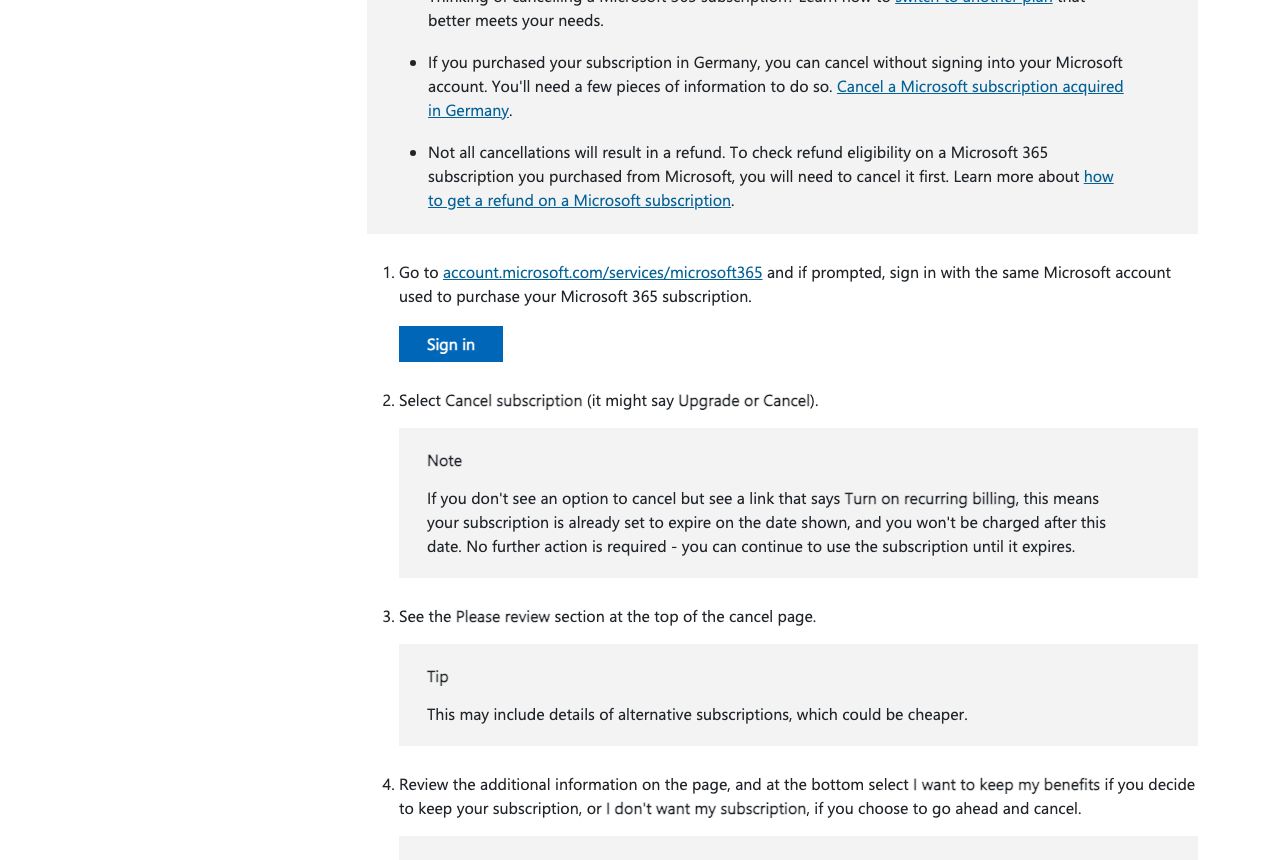
Go to account.microsoft.com/services/microsoft365 and sign in with the same Microsoft account used to buy the subscription. If you use several Microsoft accounts, the subscription only appears on the one that purchased it.
Select Cancel subscription
Select Cancel subscription; Microsoft notes the button may read Upgrade or Cancel. If you only see Turn on recurring billing instead, the subscription is already set to expire on the date shown and won't charge you again.
Review the page and choose I don't want my subscription
Microsoft shows a Please review section, which may suggest cheaper plans. At the bottom, choose I don't want my subscription to cancel, or I want to keep my benefits to back out. Microsoft says refund eligibility is determined during cancellation, so you'll see whether you qualify after this step.
Confirm the final status
Return to Services & subscriptions and confirm the subscription shows it is canceled or will expire without renewing. Keep the confirmation email and any refund details Microsoft displays.
Common pitfalls
- Canceling cuts storage to 5 GB for you and everyone on a Family plan. Over the limit, OneDrive stops syncing, Outlook.com stops sending and receiving, and after 6 months files may be deleted.
- You only learn refund eligibility after canceling. Microsoft says you have to cancel first to check.
- Seeing Turn on recurring billing instead of Cancel means the subscription is already set to expire. That's not an error, but capture the expiry date.
- App Store, Google Play, and retailer purchases can't be refunded by Microsoft; go to the seller.
- The one-time refund of a renewal charge is limited to once per Microsoft account, per subscription product.
What to capture as proof
- Services & subscriptions showing the plan, price, renewal date, and Microsoft account email.
- Your OneDrive and Outlook storage usage before canceling, especially if you share a Family plan.
- The Please review page and the I don't want my subscription choice.
- The refund eligibility result or no-refund message Microsoft shows after canceling.
- Services & subscriptions afterward showing canceled or the expiry date, plus the confirmation email.
- Any renewal charge after the expiry date on your card or bank statement.
Frequently asked questions
How do I cancel Microsoft 365?
Go to account.microsoft.com/services/microsoft365, sign in with the account that bought it, select Cancel subscription (it may say Upgrade or Cancel), review the page, and choose I don't want my subscription.
Can I get a refund on Microsoft 365?
Microsoft says you can generally get a refund within 30 days of initial purchase or before your first renewal, whichever is sooner, and a one-time refund of your most recent renewal if you cancel within 30 days of that payment. Eligibility is shown after you cancel.
What happens to my OneDrive files if I cancel Microsoft 365?
Storage drops to 5 GB. If you're over that, you can't upload or sync new files, and Microsoft says it may delete your OneDrive after 6 months. On Family plans, everyone you share with is affected.
Why don't I see a Cancel button?
If you see Turn on recurring billing instead, Microsoft says the subscription is already set to expire on the date shown and won't charge again. If you don't see the subscription at all, it may be on another Microsoft account or bought through Apple, Google, or a retailer.
I bought Microsoft 365 on my iPhone. How do I cancel?
Microsoft says App Store and Google Play purchases are canceled and refunded through Apple or Google, not your Microsoft account.
Kept isn't affiliated with or endorsed by Microsoft 365. Microsoft 365 and other names are trademarks of their owners and are used here only to identify the service. This guide is general information based on Microsoft 365's public help pages, not legal advice.