
What we verified
What we verified
This guide is based on publicly documented cancellation details. It does not claim Kept completed a private account cancellation, and company flows can change after the verification date.
- officialInstacart Help: Manage your Instacart+ membership
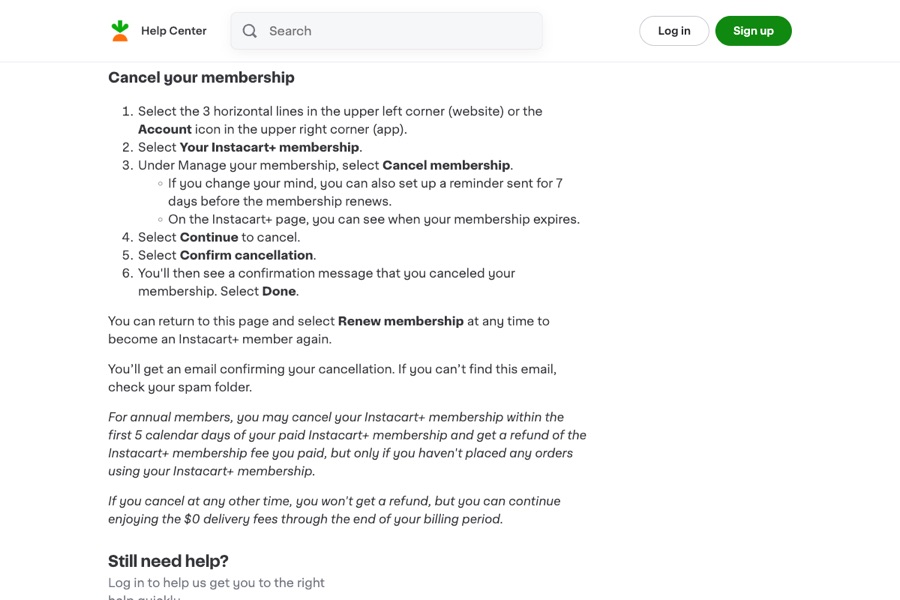
Instacart's cancel steps (Your Instacart+ membership → Cancel membership → Continue to cancel → Confirm cancellation), the reminder option, the confirmation email, the annual 5-day no-orders refund, no refund otherwise, and charges applied up to 6 hours before renewal.
Before you click cancel
Decision points that change the outcome
Cancel or set a reminder?
The reminder keeps the membership. Only Confirm cancellation ends it.
Capture:Capture the Confirm cancellation step.
Annual within 5 days, with no orders?
That's the only refund case Instacart describes.
Capture:Capture the paid start date and order history.
Close to renewal?
Charges can post up to 6 hours before renewal.
Capture:Capture the renewal date and your cancel time.
Fee risk map
Plan types to identify before canceling
Monthly Instacart+
No refund. $0 delivery fees continue to the end of the billing period.
The confirmation and email.Annual, within 5 days, no orders
Instacart says you get the membership fee refunded.
The start date, cancel time, and empty order history.Annual after 5 days or with orders
No refund; benefits continue through the billing period.
The confirmation and expiration date.Instacart+ dispute packet checklist
If the issue is an early termination fee, a missing cancel option, or a charge after cancellation, this is the evidence set that would make the timeline easier to reconstruct.
- Your Instacart+ membership page before canceling.
- Screenshots of Continue to cancel, Confirm cancellation, and the confirmation message.
- The cancellation email.
- Order history, if claiming the 5-day annual refund.
- The statement line for any later Instacart+ charge.
- Chat transcripts with Instacart support.
How this guide was built
For Instacart+, Kept focused on the confirmation step and the narrow annual refund window. We used Instacart's Manage your Instacart+ membership help section for the steps, email, refund rule, and renewal timing.
Cancellation steps
Open Your Instacart+ membership
On the website, select the 3 horizontal lines in the upper left; in the app, select the Account icon in the upper right. Then select Your Instacart+ membership. The page shows when your membership expires.
Select Cancel membership
Under Manage your membership, select Cancel membership. Instacart may offer to set a reminder 7 days before renewal instead. That reminder isn't a cancellation.
Select Continue to cancel, then Confirm cancellation
Instacart's steps: select Continue to cancel, then Confirm cancellation. You'll see a confirmation message that you canceled your membership. Select Done.
Find the confirmation email
Instacart says you'll get an email confirming your cancellation and to check spam if you can't find it.
Annual plan? Check the 5-day window
Instacart says annual members who cancel within the first 5 calendar days of the paid membership get the fee refunded, but only if they haven't placed any orders using Instacart+.
Common pitfalls
- The renewal reminder option isn't a cancellation. Only Confirm cancellation cancels.
- Instacart says renewal charges may be applied up to 6 hours before renewal, so don't wait until the last hours.
- Outside the annual 5-day, no-orders window, Instacart says you won't get a refund.
- The membership stays active to the end of the billing period, which can look like the cancel didn't work. Check for the confirmation and email.
- If your trial auto-enrolls into a paid plan, you're charged at the end of the trial unless you cancel first.
What to capture as proof
- Your Instacart+ membership page before canceling, showing plan, price, and renewal date.
- The Continue to cancel and Confirm cancellation screens.
- The confirmation message.
- The cancellation email.
- For annual plans, the paid start date and your order history showing no orders, if you're asking for the 5-day refund.
Frequently asked questions
How do I cancel Instacart+?
Open the menu (website) or Account icon (app), select Your Instacart+ membership, then Cancel membership, Continue to cancel, and Confirm cancellation.
Can I get a refund for Instacart+?
Instacart says annual members can get a refund if they cancel within the first 5 calendar days of the paid membership and haven't placed any orders with it. Otherwise there's no refund.
Do I keep Instacart+ benefits after canceling?
Yes. Instacart says you keep $0 delivery fees through the end of your billing period.
Why was I charged before my Instacart+ renewal date?
Instacart says charges may be applied up to 6 hours before renewal to a paid plan.
Kept isn't affiliated with or endorsed by Instacart+. Instacart+ and other names are trademarks of their owners and are used here only to identify the service. This guide is general information based on Instacart+'s public help pages, not legal advice.