
What we verified
What we verified
This guide is based on publicly documented cancellation details. It does not claim Kept completed a private account cancellation, and company flows can change after the verification date.
- officialWalmart Help: Manage Walmart+ Membership
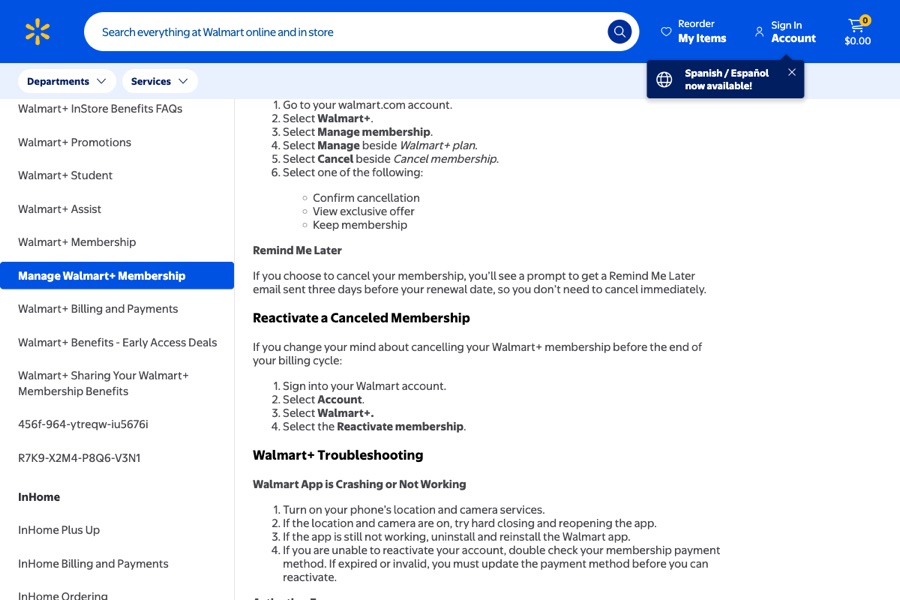
Walmart's cancel steps and the Confirm cancellation / View exclusive offer / Keep membership choices, the Remind Me Later email, pausing one month at a time up to three times a year, resuming, and reactivating before the billing cycle ends.
- officialWalmart Help: Walmart+ Billing and Payments
The $1 trial and auto-renewal, separate charges for Walmart+, InHome, and Paramount+ Premium, statement descriptors, and that Walmart isn't able to offer refunds on Walmart+.
Before you click cancel
Decision points that change the outcome
Confirm, offer, keep, or remind?
Only Confirm cancellation ends the membership.
Capture:Capture the screen with all the choices and the one you picked.
Cancel or pause?
A pause lasts a month and then billing resumes automatically.
Capture:Capture that you chose cancel.
Do you have InHome or Paramount+ Premium?
They're billed separately from Walmart+.
Capture:Capture every line on Manage membership after canceling.
Fee risk map
Plan types to identify before canceling
Monthly Walmart+
Canceling stops the next charge. Walmart says it can't offer refunds on Walmart+.
The confirmation and the Manage membership page afterward.Annual Walmart+
Same no-refund statement applies, so cancel before the renewal date.
The renewal date and the confirmation captured before it.$1 trial
The trial renews into your plan automatically unless you cancel first.
The trial end date and your confirmation before it.Walmart+ dispute packet checklist
If the issue is an early termination fee, a missing cancel option, or a charge after cancellation, this is the evidence set that would make the timeline easier to reconstruct.
- Manage membership before canceling, with plan, price, and next charge date.
- Recording or screenshots of the cancel flow through Confirm cancellation.
- Manage membership afterward showing no upcoming charge.
- Any confirmation email.
- The statement line for a later Walmart+ charge.
- Chat transcripts with Walmart Customer Care.
How this guide was built
For Walmart+, Kept focused on the final cancel screen, which offers several choices next to Confirm cancellation. We used Walmart's Manage Walmart+ Membership help page for the steps, pause, and reactivation rules, and its Billing and Payments page for trial renewal, separate charges, statement descriptors, and the refund statement.
Cancellation steps
Open Manage membership
Sign in on walmart.com, go to your account, select Walmart+, then Manage membership. This page shows your plan, next charge date, and payment method.
Select Manage beside Walmart+ plan, then Cancel
Walmart's published steps: select Manage beside Walmart+ plan, then Cancel beside Cancel membership.
Choose Confirm cancellation
Walmart then shows Confirm cancellation, View exclusive offer, Keep membership, and a Remind Me Later prompt. Only Confirm cancellation cancels. Remind Me Later just sends an email three days before renewal.
Check the result on Manage membership
Go back to Manage membership and confirm it no longer shows an upcoming charge. Walmart says you can reactivate before the end of the billing cycle, so the page should show a Reactivate option if the cancel worked.
Check add-ons and Plus Ups
Walmart bills Walmart+, InHome, and Paramount+ Premium as separate charges. Look at each line on Manage membership after canceling.
Common pitfalls
- Remind Me Later, View exclusive offer, and Keep membership all sit next to Confirm cancellation. Only Confirm cancellation ends the membership.
- Walmart's billing page says it isn't able to offer refunds on Walmart+.
- Pausing isn't canceling. A paused membership resumes after the month and bills on your regular date.
- The $1 trial automatically renews into your selected plan when it ends.
- Walmart+ InHome and Paramount+ Premium show up as separate charges, so one line can keep billing after another is gone.
What to capture as proof
- Manage membership before canceling, showing plan, price, next charge date, and any Plus Ups.
- The screen with Confirm cancellation, View exclusive offer, and Keep membership, and your selection.
- The confirmation screen and any email.
- Manage membership afterward showing no upcoming charge.
- Your statement line if charged again. Walmart's examples look like "Walmart+ Member 08/25" or "Walmart+ Member PRORATED".
Frequently asked questions
How do I cancel Walmart+?
On walmart.com go to Account → Walmart+ → Manage membership → Manage beside Walmart+ plan → Cancel beside Cancel membership, then choose Confirm cancellation.
Will Walmart refund my Walmart+ membership?
Walmart's Billing and Payments help page says it isn't able to offer refunds on Walmart+.
What's the difference between pausing and canceling Walmart+?
Pausing stops billing for one month and then resumes automatically. You can pause up to three times a year, but not during a trial. Canceling stops renewal.
Does the Walmart+ $1 trial cancel itself?
No. Walmart says after the trial ends your membership automatically renews and you're charged for your selected plan.
I see a Walmart+ charge I don't recognize. What should I do?
Walmart says to use Chat with us and type Unauthorized Charges, since it may be a compromised card. Also check for separate InHome or Paramount+ Premium lines.
Kept isn't affiliated with or endorsed by Walmart+. Walmart+ and other names are trademarks of their owners and are used here only to identify the service. This guide is general information based on Walmart+'s public help pages, not legal advice.