
What we verified
What we verified
This guide is based on publicly documented cancellation details. It does not claim Kept completed a private account cancellation, and company flows can change after the verification date.
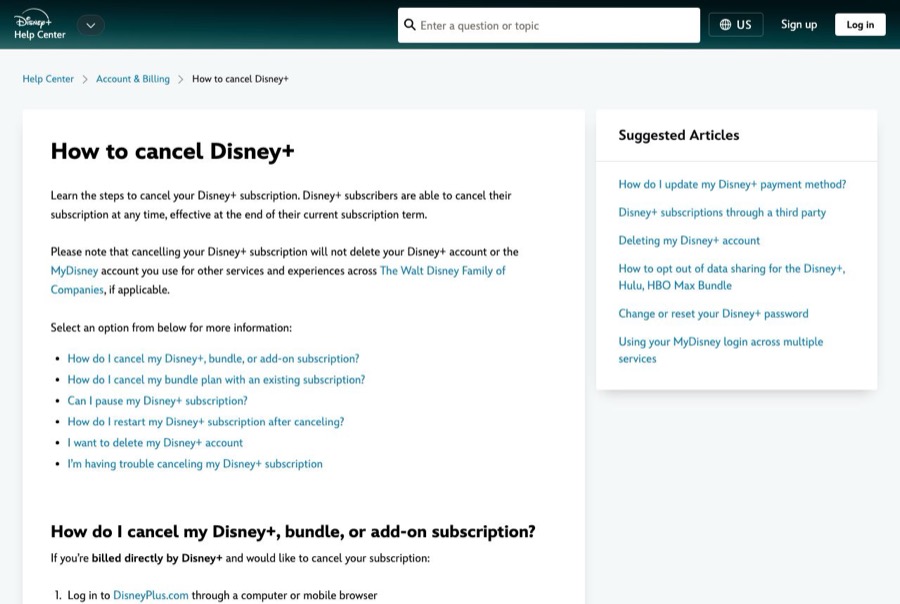
- officialDisney+ Help Center: How to cancel Disney+
Disney's cancel steps (DisneyPlus.com → Profile → Account → subscription → Cancel Subscription), access until the end of the term, third-party billing, bundle behavior when canceling the bundle or the original subscription, pause rules, restarting, and that canceling doesn't delete the account.
- officialDisney+ Subscriber Agreement
Section 2 on auto-renewal, free trials, and the cancellation and refund policy: cancel before 11:59 p.m. ET the day before the term ends, no refunds for partially used terms except as required by law, and third-party subscriptions governed by the third party's terms.
Before you click cancel
Decision points that change the outcome
Do you have a bundle?
Canceling a bundle can leave a Hulu, ESPN, or third-party subscription you had before upgrading still billing at full price.
Capture:Capture every subscription line on the Account page before and after.
Who bills you?
Disney-billed subscriptions are canceled on DisneyPlus.com. Hulu-billed plans can be managed through Hulu, HBO Max bundles through HBO Max, and other partners with that partner.
Capture:Capture the billing details for each subscription.
Monthly, annual, or promotional?
Disney says access timing after canceling depends on the plan. Annual terms aren't refunded for unused months.
Capture:Capture the plan type and the end date Disney shows.
How close is the end of the term?
The Subscriber Agreement's cutoff is 11:59 p.m. Eastern on the day before the term ends.
Capture:Capture the renewal date and the time you canceled.
Fee risk map
Plan types to identify before canceling
Monthly Disney+ billed by Disney
Access continues to the end of the month you paid for; no partial refund.
The confirmation and end date, captured before the 11:59 p.m. ET cutoff.Annual Disney+
Canceling stops the next renewal, but Disney doesn't refund the unused part of the year except where the law requires it.
The end date and the Account page showing auto-renewal off.Bundle after upgrading from Hulu or ESPN
Canceling the bundle can restart billing for your original subscription at the current price unless you cancel it too.
The Account page showing every subscription's status after canceling.Free trial or promo
Disney says cancellation may take effect immediately.
The confirmation and the date access ended.Disney+ dispute packet checklist
If the issue is an early termination fee, a missing cancel option, or a charge after cancellation, this is the evidence set that would make the timeline easier to reconstruct.
- The Account page before canceling, listing every subscription, bundle, and add-on with prices and renewal dates.
- Recording or screenshots of the Cancel Subscription flow and final confirmation.
- The confirmation email and the time you canceled.
- The Account page afterward showing what's canceled and what's still active.
- Any Disney+, Hulu, or ESPN charge after the end date on your statement.
- Support chat transcripts with Disney+, Hulu, or HBO Max.
How this guide was built
For Disney+, Kept organized the guide around bundles and the renewal cutoff, which cause most surprise charges. We used Disney's How to cancel Disney+ help article for the steps, bundle behavior, and pause rules, and the Disney+ Subscriber Agreement for the 11:59 p.m. Eastern cutoff, refund policy, and third-party billing.
Cancellation steps
Use a browser, not the TV app
Disney's steps for subscriptions billed by Disney+ start with logging in to DisneyPlus.com through a computer or mobile browser. Select your Profile, then Account, to see your subscriptions.
Check who bills you and whether it's a bundle
Under Subscription, look at what you have: Disney+ alone, a bundle (Disney+, Hulu, ESPN or Disney+, Hulu, HBO Max), or add-ons. Disney says third-party billed subscriptions are canceled with the billing partner. A Disney+, Hulu, HBO Max Bundle bought through HBO Max is managed through HBO Max.
Select the subscription, then Cancel Subscription
Disney's published steps: Profile → Account → select your Disney+ subscription under Subscription → Cancel Subscription. You keep access until the end of the current subscription term; Disney says timing depends on whether you're billed monthly, annually, or in a promotional period.
If you upgraded to a bundle, cancel each piece you don't want
Disney says that if you had a Hulu, ESPN, or HBO Max subscription before upgrading to a bundle, canceling the bundle leaves the original subscription running at the then-current price. Canceling the original subscription leaves the bundle running. Check every line under Subscription after you cancel.
Beat the cutoff
Disney's Subscriber Agreement says you must cancel before 11:59 p.m. Eastern Time on the day before your subscription term ends to avoid being charged for the next term. Free trial, promo code, or credit subscriptions may end immediately when canceled.
Capture the result
Save the confirmation and email, then reopen Account and capture each subscription's status. Canceling doesn't delete your Disney+ or MyDisney account. Deleting the account is a separate step you can do after canceling.
Common pitfalls
- Canceling a bundle can bring back your original Hulu, ESPN, or third-party subscription at full price. Disney says it keeps billing until you cancel it separately.
- If you cancel after 11:59 p.m. Eastern on the day before your term ends, you can be charged for the next term.
- Disney doesn't refund partial terms except where the law requires it, so an annual plan canceled early still runs to the end of the term.
- Pausing isn't canceling. A paused Disney+ subscription starts billing again automatically when the pause ends, and pausing also pauses the other services in a bundle.
- Third-party billing (an app store, carrier, or partner) has to be canceled with that partner, and the Subscriber Agreement says their terms apply.
What to capture as proof
- The Account page Subscription section listing every subscription, bundle, and add-on, with prices and renewal dates.
- Who bills each subscription, if any line points to a third party, Hulu, or HBO Max.
- The Cancel Subscription screens and the final confirmation, including the date access ends.
- The confirmation email.
- The Account page afterward showing every remaining subscription, so a leftover Hulu or ESPN charge is easy to explain.
- The time you canceled, if you're close to the 11:59 p.m. Eastern cutoff.
Frequently asked questions
How do I cancel Disney+?
In a computer or mobile browser, log in at DisneyPlus.com, select your Profile → Account, select your Disney+ subscription under Subscription, and choose Cancel Subscription.
Will Disney+ refund the rest of my subscription?
Disney's Subscriber Agreement says it doesn't refund or credit partially used terms or billing periods except as required by law. You keep access until the end of the current term.
I canceled my Disney+ bundle. Why is Hulu still charging me?
Disney says that if you had Hulu, ESPN, or HBO Max before upgrading to a bundle, canceling the bundle leaves that original subscription running at the then-current price. Cancel it separately.
When do I have to cancel Disney+ to avoid the next charge?
Disney's Subscriber Agreement says before 11:59 p.m. Eastern Time on the day before your subscription term ends.
Does canceling Disney+ delete my account?
No. Canceling stops billing but keeps your Disney+ and MyDisney account. You can delete the account separately after canceling.
Kept isn't affiliated with or endorsed by Disney+. Disney+ and other names are trademarks of their owners and are used here only to identify the service. This guide is general information based on Disney+'s public help pages, not legal advice.