What we verified
What we verified
This guide is based on publicly documented cancellation details. It does not claim Kept completed a private account cancellation, and company flows can change after the verification date.
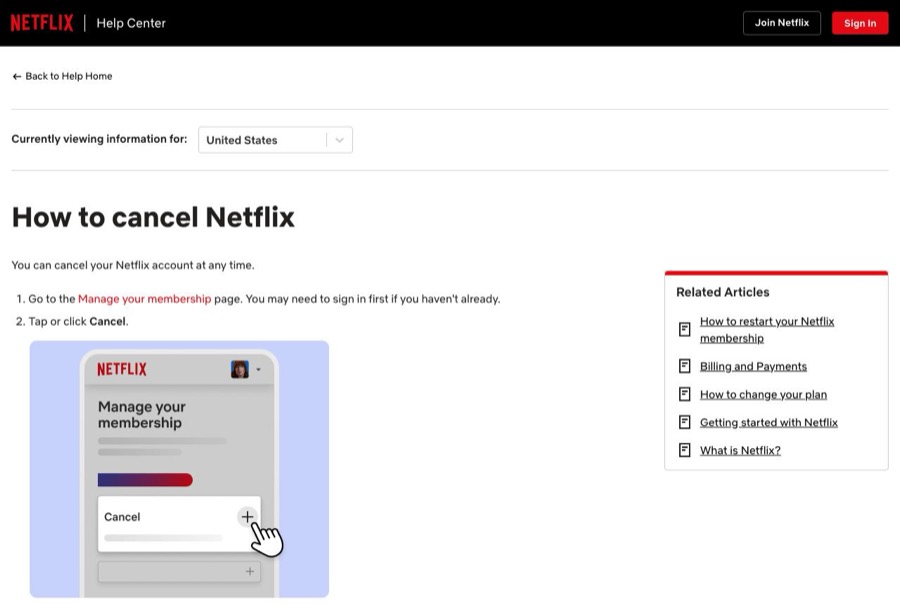
- officialNetflix Help Center: How to cancel Netflix
Netflix's cancellation steps (Manage your membership → Cancel → Finish Cancellation), confirmation email, access until the end of the billing period, partner-billed accounts, the pause alternative, and the 24-month data retention after closing.
- officialNetflix Help Center: Charged after canceling Netflix
Netflix's explanation that a charge after canceling usually means someone restarted the account, and its advice to cancel again, change the password, and sign out of all devices.
- officialNetflix Help Center: Netflix billing through Comcast Xfinity
Example of a partner-billed Netflix membership that is managed through the partner rather than on netflix.com.
Before you click cancel
Decision points that change the outcome
Does a Cancel button appear at all?
No cancel option means Netflix is billed by a partner such as Apple, Comcast Xfinity, or Cox, and the cancellation has to be done there.
Capture:Capture the Membership section showing either the Cancel option or Netflix's partner instructions.
Cancel or pause?
A pause stops billing temporarily, then resumes automatically. It is not a cancellation and won't stop future charges.
Capture:Capture the screen where you chose Cancel rather than pause.
Who else is signed in?
Netflix says a charge after canceling usually means someone using the account restarted it. A restart can happen from any device still signed in.
Capture:Capture the password change and Sign out of all devices confirmation, with the date.
Fee risk map
Plan types to identify before canceling
Monthly plan billed by Netflix
Netflix's help page says you keep access until the end of the billing period, then the account closes and you won't be charged again unless it's restarted. The help page doesn't promise a refund for the unused part of the month.
The Finish Cancellation screen, confirmation email, and the end date shown on the Account page.Netflix billed through Apple, Xfinity, Cox, or another partner
Cancel and request any refund through the partner. Netflix's own cancel page will point you there.
The partner's subscription screen showing Netflix, the cancellation confirmation, and the partner's end date.Charged again after canceling
Netflix's guidance is to check whether the account was restarted, cancel again, and secure the account. A dated cancellation confirmation is what shows the later charge wasn't authorized by you.
The original confirmation email and date, the new charge on your statement, and any support chat with Netflix.Netflix dispute packet checklist
If the issue is an early termination fee, a missing cancel option, or a charge after cancellation, this is the evidence set that would make the timeline easier to reconstruct.
- Account page Membership section before canceling, showing plan, price, and next billing date.
- Recording or screenshots of Cancel → Finish Cancellation.
- The cancellation confirmation email.
- The Account page after canceling showing the end date.
- Proof you changed the password and signed out of all devices, if someone else may have restarted the account.
- The card statement line for any charge after the end date, plus any Netflix support chat transcript.
How this guide was built
For Netflix, Kept organized the guide around the most common dispute: being charged after canceling. We used Netflix's cancel help page for the steps and what happens after, its charged-after-canceling article for the restart explanation, and its partner billing pages for accounts billed through Apple or a cable company.
Cancellation steps
Sign in to the account that is actually billed
Households often share one Netflix account across several emails and devices. Sign in with the account whose payment method is being charged, then open the Account page and look at the Membership section to see the plan, price, and next billing date.
Check whether Netflix or a partner bills you
Netflix says that if you don't see an option to cancel, your Account page will show a link or instructions for your payment partner instead. Netflix can be billed through partners such as Apple, Comcast Xfinity, or Cox, and in that case the cancellation happens with that partner, not on netflix.com.
Go to Manage your membership and choose Cancel
Netflix's published steps: go to the Manage your membership page (netflix.com/cancelplan), signing in if needed, then tap or click Cancel. Netflix may present a pause option first on eligible plans; pausing is not the same as canceling.
Select Finish Cancellation
Under Cancel, select Finish Cancellation. Netflix says this is the only way to cancel and end the membership: signing out of the account or deleting the Netflix app does not cancel it. Don't close the tab before this step completes.
Save the confirmation email and the end date
Netflix sends a confirmation email to the address on the account. If you canceled with time left, Netflix says you can keep watching until the account cancels automatically at the end of the billing period, and you won't be charged again unless you restart the account.
Lock the account so nobody restarts it
Netflix's help article on being charged after canceling says someone using your account may have accidentally restarted it. Netflix recommends changing your password and choosing Sign out of all devices so people on old TVs or phones can't restart the membership with a tap.
Common pitfalls
- Deleting the Netflix app or signing out does not cancel. Only Finish Cancellation on the Manage your membership page (or canceling with your billing partner) does.
- A paused membership is still a membership. Netflix's pause resumes automatically and billing restarts after the pause ends.
- Anyone still signed in on a TV, console, or phone can restart a canceled account before or after it closes. That restart is the most common cause of a charge after canceling, according to Netflix.
- If Netflix is billed through Apple, your cable company, or another partner, canceling has to happen with that partner. Netflix's own page will only show you instructions.
- Netflix keeps viewing history and account details for 24 months after the account closes, which makes a restart one click away. A restart isn't a new signup, so keep proof of the original cancellation date.
What to capture as proof
- The Account page Membership section showing the plan, price, next billing date, and the account email you're signed in with.
- Who bills you: the payment method on the Account page, or the partner instructions Netflix shows instead of a cancel option.
- The Cancel screen and the Finish Cancellation confirmation, including any end date Netflix displays.
- The cancellation confirmation email.
- The Account page afterward showing the membership ends on a specific date, plus the Sign out of all devices confirmation if you used it.
- Your next card statement, if a Netflix charge appears after the end date.
Frequently asked questions
How do I cancel Netflix?
Go to the Manage your membership page at netflix.com/cancelplan, sign in if needed, choose Cancel, then choose Finish Cancellation. Netflix sends a confirmation email to the account email.
Why was I charged after canceling Netflix?
Netflix's help center says the usual reason is that you or someone using your account restarted it. Cancel again at netflix.com/cancelplan, then change your password and choose Sign out of all devices. Keep the original confirmation email to show when you first canceled.
Does deleting the Netflix app cancel my membership?
No. Netflix says signing out or deleting the app does not cancel your account. Only Finish Cancellation on the Manage your membership page, or canceling with your billing partner, ends the membership.
I don't see a Cancel option. What now?
Netflix says that means you're billed through a partner. The Membership section of your Account page will show a link or instructions for that partner, such as Apple, Comcast Xfinity, or Cox.
Can I keep watching after I cancel?
Yes. Netflix says if you cancel with time left in your billing period, you can keep watching until the account cancels automatically at the end of that period.
Kept isn't affiliated with or endorsed by Netflix. Netflix and other names are trademarks of their owners and are used here only to identify the service. This guide is general information based on Netflix's public help pages, not legal advice.