
What we verified
What we verified
This guide is based on publicly documented cancellation details. It does not claim Kept completed a private account cancellation, and company flows can change after the verification date.
- officialDropbox Help: How to cancel or change an individual Dropbox subscription
Dropbox's cancel steps (avatar → Manage account → Cancel plan → reason → Continue canceling), downgrade to Basic (2 GB) at the end of the billing cycle, over-quota restrictions and possible file deletion, app store exception, the "Dropbox Plan will not renew" confirmation email, the "Plan downgrade scheduled" Billing notice, and cancellation by mail.
- officialDropbox Help: Cancel a Dropbox subscription bought on a mobile device
Steps for subscriptions purchased through the Apple App Store or Google Play.
- officialDropbox Help: Cancel a Dropbox Family plan
Separate cancellation path for Family plans.
Before you click cancel
Decision points that change the outcome
Bought on the web or in an app store?
Web purchases are canceled on dropbox.com; app store purchases only through Apple or Google.
Capture:The Billing page or app store subscription screen showing who bills you.
Will you be over 2 GB?
Basic has 2 GB. Over quota, files stop syncing and sharing, and Dropbox may delete files you own.
Capture:Storage usage before canceling, and proof you downloaded what you need.
Individual, Family, or team?
Family and team plans have separate cancellation steps and may affect other members.
Capture:The plan type on your Billing page.
Fee risk map
Plan types to identify before canceling
Monthly individual plan
The plan runs to the end of the month, then drops to Basic with no further charge.
The will-not-renew email and the Plan downgrade scheduled notice.Yearly individual plan
The plan runs to the end of the year, then drops to Basic. Don't assume a prorated refund; check Dropbox's refund options.
Upcoming invoice date before canceling and the confirmation that it won't renew.Bought through the App Store or Google Play
Cancel and request refunds through the store.
The store's canceled subscription screen.Dropbox dispute packet checklist
If the issue is an early termination fee, a missing cancel option, or a charge after cancellation, this is the evidence set that would make the timeline easier to reconstruct.
- Billing page before canceling: plan, price, Upcoming invoice date.
- Recording of the Cancel plan flow.
- "Dropbox Plan will not renew" email.
- "Plan downgrade scheduled" notice on the Billing tab.
- Any later charge on your statement.
- Mail cancellation letter and delivery proof, if used.
How this guide was built
For Dropbox, Kept focused on the two confirmations Dropbox documents, the will-not-renew email and the downgrade-scheduled notice, plus the 2 GB storage cliff. We used Dropbox Help's individual, mobile, and Family cancellation articles.
Cancellation steps
Check which kind of plan you have
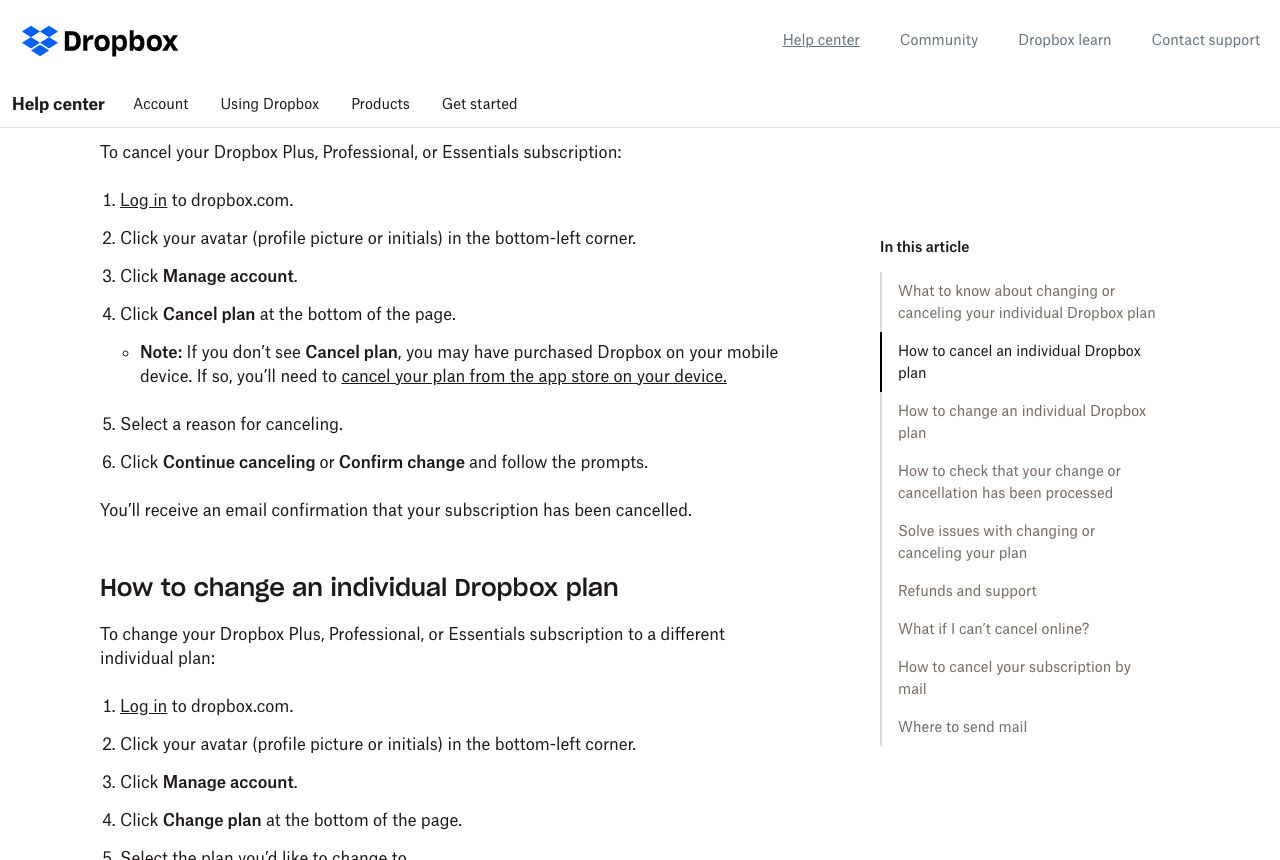
These steps are for individual Plus, Professional, and Essentials plans. Dropbox has separate cancellation steps for Family plans, team plans, and free trials. If you bought Dropbox in the iOS or Android app, Dropbox says you'll need to cancel through that app store; in that case Cancel plan won't appear on dropbox.com.
Get under 2 GB, or download your files
Dropbox says your account changes to Dropbox Basic, which includes 2 GB, at the end of your billing cycle. If you're over that quota you may not be able to sync, upload, share, move, or preview files, and if the account stays over the limit Dropbox may delete files you own to bring it under.
Open Manage account and select Cancel plan
Log in to dropbox.com, click your avatar (profile picture or initials) in the bottom-left corner, click Manage account, then click Cancel plan at the bottom of the page.
Choose a reason and finish the prompts
Select a reason for canceling, then click Continue canceling or Confirm change and follow the remaining prompts. Dropbox may offer a cheaper plan; Change plan is a different action from Cancel plan.
Check the email and the Billing tab
Dropbox says you'll get an email from [email protected] with the subject "Dropbox Plan will not renew." To double-check, go to the Billing tab in account settings and click Change next to Billing period; you should see "Plan downgrade scheduled."
If you can't cancel online, cancel by mail
Dropbox offers cancellation by physical mail using its template or a letter with your name, the account email (or the best email to reach you), and your payment method. Send it in a way that gives you proof of delivery.
Common pitfalls
- Deleting the Dropbox app doesn't cancel your plan or delete your account. Dropbox says so in its help article.
- Letting your card expire doesn't cancel Dropbox. Dropbox notes your bank may automatically move the charge to your new card.
- Dropping to Basic leaves you with 2 GB. Over the limit, syncing and sharing stop, and Dropbox may delete files you own.
- Downgrading to Basic is not the same as deleting your account, and deleting your account is not how you cancel billing.
- App store purchases can't be canceled from dropbox.com, so the Cancel plan option won't appear there.
What to capture as proof
- The Billing page showing your plan, price, and next billing date under Upcoming invoice.
- Your storage usage before canceling.
- The Cancel plan flow, including the reason screen and any offers, through the final confirmation.
- The "Dropbox Plan will not renew" email from [email protected].
- The "Plan downgrade scheduled" notice on the Billing tab.
- For mail cancellations, the letter and proof of delivery.
Frequently asked questions
How do I cancel Dropbox Plus?
On dropbox.com, click your avatar in the bottom-left corner, choose Manage account, click Cancel plan at the bottom, select a reason, and click Continue canceling. Your account becomes Dropbox Basic at the end of the billing cycle.
What happens to my files if I cancel Dropbox?
Your account moves to Dropbox Basic with 2 GB. If you're over, Dropbox says you may not be able to sync, upload, share, move, or preview files, and it may delete files you own if the account stays over the limit.
How do I know my Dropbox cancellation went through?
Dropbox sends an email with the subject "Dropbox Plan will not renew" from [email protected], and the Billing tab shows "Plan downgrade scheduled" when you click Change next to Billing period.
Why don't I see Cancel plan?
Dropbox says that usually means you bought Dropbox in a mobile app, so you need to cancel through the App Store or Google Play.
Does deleting the Dropbox app cancel my subscription?
No. Dropbox says deleting the app doesn't cancel your plan or delete your account.
Kept isn't affiliated with or endorsed by Dropbox. Dropbox and other names are trademarks of their owners and are used here only to identify the service. This guide is general information based on Dropbox's public help pages, not legal advice.