What we verified
What we verified
This guide is based on publicly documented cancellation details. It does not claim Kept completed a private account cancellation, and company flows can change after the verification date.
- officialSpotify Support: How to cancel Premium plans
Spotify's steps (Manage your plan → Cancel subscription), Premium until the next billing date, free trial behavior, Family and Duo manager versus member, partner-billed plans, and the cancellation form.
- officialSpotify Support: Canceled but still charged
How to read the Payment line: Spotify Free, a next payment date (not canceled), a switch-to-free date (canceled), or a partner company.
- officialSpotify Support: Refund policy
Cancel any time and keep what you paid for, revert to Free immediately on a free trial, and no refunds for store gift cards or Premium paid through a partner.
Before you click cancel
Decision points that change the outcome
Is there an option to change plan?
If not, a partner company bills you and the cancel happens there.
Capture:Capture the Payment section.
Are you the Family or Duo plan manager?
Members can only leave the plan. The manager has to cancel it.
Capture:Capture the plan page showing your role.
What does the Payment line say afterward?
A switch-to-free date means canceled. A next payment date means it isn't.
Capture:Capture the Payment line after you finish.
Fee risk map
Plan types to identify before canceling
Premium billed by Spotify
Premium continues to the next billing date, then the account switches to Free. Spotify's policy is that you keep what you paid for.
The Payment line showing the switch date.Premium through a phone or internet provider
Cancel and ask for any refund with the partner. Spotify says it can't refund those payments.
The partner's confirmation and the Payment section naming them.Charged after canceling
Spotify says you may have canceled just after a payment processed, or Premium is on a different account.
The switch-to-free date, the charge date, and which account was billed.Spotify dispute packet checklist
If the issue is an early termination fee, a missing cancel option, or a charge after cancellation, this is the evidence set that would make the timeline easier to reconstruct.
- The account page before canceling, showing the login email, plan, and Payment line.
- Recording or screenshots of Cancel subscription through the confirmation message.
- The Payment line afterward showing the date the account switches to Free.
- The card statement line for any later Spotify charge.
- Proof you checked other Spotify logins, if Spotify says the charge is on another account.
- Support chat transcripts with Spotify or the partner.
How this guide was built
For Spotify, Kept organized the guide around the account page's Payment line, which Spotify's own help uses to tell you whether a cancellation worked. We used Spotify's How to cancel Premium plans, Canceled but still charged, and Refund policy articles.
Cancellation steps
Sign in to the account that's actually charged
Spotify says that if your account page shows Spotify Free but you're still being charged, you likely have Premium on a different Spotify account. Check each login you've used.
Go to Manage your plan and select Cancel subscription
Spotify's published steps: on your account page, go to Manage your plan, then select Cancel subscription.
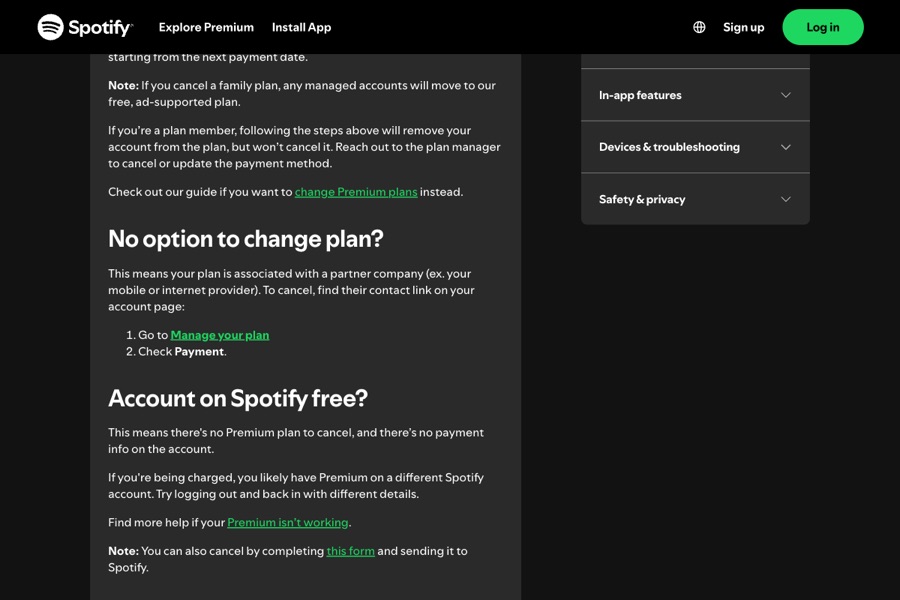
No option to change plan? Find the partner
Spotify says this means your plan is associated with a partner company, such as your mobile or internet provider. Go to Manage your plan and check Payment for the partner's contact link, then cancel with them.
Family and Duo: only the plan manager can cancel
If you're the plan manager, the same steps cancel the plan and managed accounts move to the free plan. If you're a plan member, the steps remove you from the plan but don't cancel it. Ask the manager.
Confirm the Payment line says the switch date
Spotify's Canceled but still charged article: if Payment shows the date your account will switch to Spotify Free, the cancel worked. If it shows a next payment due date, the account isn't canceled. Try again and make sure you reach the confirmation message.
Common pitfalls
- Not reaching the confirmation message means the plan isn't canceled. Spotify says a next payment date on the account page is the sign.
- Family and Duo members can't cancel the plan, only leave it. The plan manager has to cancel.
- Premium through a phone or internet provider has to be canceled with that partner, and Spotify says it can't refund those payments.
- Canceling during a zero-priced free trial switches you to Free immediately, and Spotify says those trials can't be reactivated.
- A charge after canceling can be from a second Spotify account. Check every login before disputing.
What to capture as proof
- The account page showing the email you're signed in with, your plan, and the Payment line before canceling.
- The Cancel subscription screens and the confirmation message.
- The Payment line afterward showing the date your account switches to Spotify Free.
- For partner billing, the Payment section naming the partner.
- For Family or Duo, who the plan manager is.
Frequently asked questions
How do I cancel Spotify Premium?
On your Spotify account page, go to Manage your plan and select Cancel subscription. Premium stays until your next billing date, then your account switches to free.
Why was I charged after canceling Spotify?
Spotify says to check the Payment line on your account page. A next payment date means the cancel didn't go through. A switch-to-free date means you probably canceled just after a payment processed. Spotify Free with charges means Premium is likely on another account.
Will Spotify refund my Premium payment?
Spotify's refund policy says you can cancel any time and keep what you paid for, with Premium until the end of the billing period. It can't refund Premium paid through a partner.
How do I cancel a Spotify Family plan?
Only the plan manager can cancel. Members following the cancel steps are removed from the plan, but the plan keeps going.
Do I lose my playlists if I cancel?
No. Spotify says you keep your playlists and saved music on a free account.
Kept isn't affiliated with or endorsed by Spotify. Spotify and other names are trademarks of their owners and are used here only to identify the service. This guide is general information based on Spotify's public help pages, not legal advice.