
What we verified
What we verified
This guide is based on publicly documented cancellation details. It does not claim Kept completed a private account cancellation, and company flows can change after the verification date.
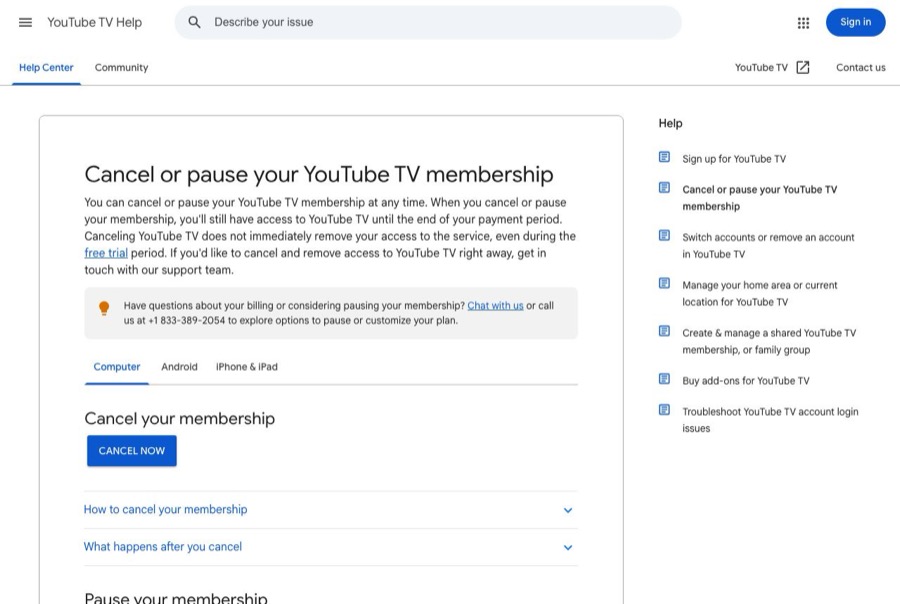
- officialYouTube TV Help: Cancel or pause your YouTube TV membership
Google's cancel steps for web and Android, access until the end of the payment period (including during a free trial), 21-day recording expiry, the 4-week to 6-month pause and automatic billing when it ends, and individual add-on removal.
- officialYouTube TV Help: Request a refund for YouTube TV
Google's YouTube TV refund policy: no refunds or credits for partial billing periods, refunds only when features are defective or don't perform as stated, 3 to 10 business days for card refunds, and carrier- or ISP-billed memberships refunded by that provider.
Before you click cancel
Decision points that change the outcome
Cancel or pause?
A pause of 4 weeks to 6 months restarts billing at the regular monthly price automatically. Only canceling stops billing for good.
Capture:Capture the screen where you chose Cancel membership instead of a pause.
Who bills you?
YouTube can't refund memberships billed through a mobile carrier or internet provider; that provider handles it.
Capture:Capture the Membership page billing details or the partner notice.
Base plan or just an add-on?
Add-ons like premium networks or 4K can be removed separately. A dispute over the wrong amount depends on showing exactly what you removed.
Capture:Capture the Membership page before and after, showing the items and the monthly total.
How close is your billing date?
Google doesn't refund partial billing periods, so the date you cancel decides whether one more charge goes through.
Capture:Capture the next billing date shown before you cancel.
Fee risk map
Plan types to identify before canceling
Free trial
Cancel before the trial ends to avoid the first charge. Google says you keep access until the trial period ends.
The trial end date shown before canceling and the cancellation confirmation.Monthly membership billed by YouTube
Access continues until the end of the paid month, with no partial refund. No further charges after that.
The confirmation, the end date, and the Membership page showing the membership ending.Paused membership
Billing resumes at the regular monthly price when the pause ends unless you cancel before then.
The pause start and resume dates, and a cancellation confirmation if you later cancel during the pause.Billed through a carrier or internet provider
Cancel and request refunds through the provider; YouTube can't process them.
The provider's account page showing YouTube TV and its cancellation confirmation.YouTube TV dispute packet checklist
If the issue is an early termination fee, a missing cancel option, or a charge after cancellation, this is the evidence set that would make the timeline easier to reconstruct.
- Membership page before canceling, showing plan, add-ons, price, next billing date, and account.
- Recording or screenshots of every screen from Manage to the final Cancel, including any pause offer you declined.
- The cancellation confirmation and the date access ends.
- The Membership page afterward showing the membership ending.
- Any YouTube TV charge on your statement dated after the end date.
- Chat or call notes with YouTube TV support (+1 833-389-2054), with dates and what they said.
How this guide was built
For YouTube TV, Kept organized the guide around the cancel-versus-pause choice and the no-partial-refund rule, since those cause most surprise charges. We used Google's YouTube TV help article on canceling or pausing for the steps and timing, and Google's YouTube TV refund article for the refund rules and partner billing.
Cancellation steps
Sign in to the family manager's account
Only the account that pays for YouTube TV can cancel it. Sign in at tv.youtube.com with that Google account, then select your profile photo → Settings → Membership to see the base plan, any add-on networks, the price, and the next billing date.
Check whether a carrier or internet provider bills you
Google's YouTube TV refund page says memberships bought through a mobile carrier or internet provider are refunded by that provider, not by YouTube. If your Membership page points to a partner, capture that and plan to cancel or request refunds with them.
Decide whether you're canceling or pausing
YouTube TV offers a pause of 4 weeks to 6 months that starts after the current billing cycle. When the pause ends, Google says you're charged the regular monthly price automatically. If you want billing to stop for good, choose Cancel membership, not pause.
Cancel: Settings → Membership → Manage → Cancel membership
Google's published desktop steps: on YouTube TV in a web browser, select your profile photo → Settings → Membership → Manage → Cancel membership → Cancel. The Android app uses the same path. Expect offers or a pause suggestion along the way; read each screen before continuing.
Remove add-ons separately if you're keeping the base plan
Add-on networks can be removed individually from the same Membership page. If you're only dropping an add-on, capture that the add-on, not the base plan, was removed and the new monthly total.
Note the end date and the 21-day recording window
Google says you keep access until the end of your payment period, and recorded programs in your library expire 21 days after that. Save the confirmation and check the Membership page afterward to confirm it shows the membership ending.
Common pitfalls
- A pause is not a cancellation. YouTube TV charges the regular monthly price automatically when the pause ends, and promotional pricing may not come back.
- Canceling doesn't end access immediately, even during a free trial. Google says you have to contact support if you want access removed right away.
- Google gives no refunds or credits for partial billing periods, so canceling the day after renewal still means paying for that month.
- If you signed up through a mobile carrier or internet provider, YouTube can't refund you. That provider handles cancellation and refunds.
- Only the account that pays (the family manager) can cancel. Family group members signing out won't stop billing.
What to capture as proof
- The Membership page showing the base plan, add-ons, monthly price, next billing date, and the Google account you're signed in with.
- Any partner or provider billing notice on the Membership page.
- Each screen from Manage to the final Cancel, including any pause offer or discount you declined.
- The confirmation that the membership is canceled and the date access ends.
- The Membership page afterward showing the membership ending, or the add-on removed and new total.
- Your next card statement, if a YouTube TV charge appears after the end date.
Frequently asked questions
How do I cancel YouTube TV?
In a web browser, go to tv.youtube.com, select your profile photo → Settings → Membership → Manage → Cancel membership → Cancel. The Android app uses the same path.
Does YouTube TV refund the rest of the month?
No. Google's YouTube TV refund policy says there are no refunds or credits for partial billing periods. You keep access until the end of the period you paid for.
What happens to my recordings after I cancel?
Google says recorded programs in your library expire 21 days after your billing period ends.
Is pausing YouTube TV the same as canceling?
No. A pause lasts 4 weeks to 6 months, starts after the current billing cycle, and then charges the regular monthly price automatically. Cancel if you want billing to stop.
I get YouTube TV through my phone or internet company. Who do I cancel with?
Google says memberships bought through a mobile carrier or internet provider are refunded by that provider, so manage the cancellation and any refund with them.
Kept isn't affiliated with or endorsed by YouTube TV. YouTube TV and other names are trademarks of their owners and are used here only to identify the service. This guide is general information based on YouTube TV's public help pages, not legal advice.